
Appearance
The best CMS for Filament depends on who edits the pages
The best CMS for Filament is the one that matches who edits the pages and where those pages are rendered. If developers edit a few pages, Filament's own Builder field is enough; if non-developers need to design pages with a live preview inside your panel, a visual builder such as FilamentCraft earns its price, and if your front end is a separate JavaScript app, a headless CMS fits better than any Filament plugin.
We sell FilamentCraft, so read this with that in mind. We have tried to be specific about where it is the wrong tool, because a refund costs us more than an honest "not for you".
Three questions that decide it
Before comparing tools, answer these about your project. Most of the decision falls out of them.
- Who edits page layout: your developers, or your users and clients?
- Where is the public site rendered: by the same Laravel app, or by a separate front end?
- How many sites are there: one, or one per tenant?
A developer-edited single site rendered by Laravel is the simplest case, and it does not need a product. A multi-tenant SaaS where each customer designs their own storefront is the hardest case, and building it yourself is months of work.
Option 1: build it with the Filament Builder field
The Builder field is the default answer for developer-controlled pages. Filament describes it as a repeater that lets you "define different schema 'blocks', which you can repeat in any order" (Filament 4.x Builder docs). You define each block with Block::make() and a schema, store the result in a JSON column with an array cast, and render the blocks yourself in Blade.
php
use Filament\Forms\Components\Builder;
use Filament\Forms\Components\Builder\Block;
use Filament\Forms\Components\TextInput;

Builder::make('content')
    ->blocks([
        Block::make('heading')
            ->schema([
                TextInput::make('content')->required(),
            ]),
    ]);
The same docs page covers blockPreviews(), which renders a Blade preview of each block in place of its form. That preview is per block, inside the form, and you write the view for it.
Pick this when a developer is always in the loop and the page structure changes rarely. It costs nothing and there is no new dependency to learn.
What you will end up building by hand as the project grows: public routing for page slugs, draft versus published state, revisions, a theme or color system your users can change, per-locale content, SEO fields, and a real preview of the finished page. Each is a reasonable afternoon on its own. Together they are a product.
Option 2: Filament Fabricator
Filament Fabricator is the open-source step up from a raw Builder field. Its README calls it "a block-based page builder skeleton" and says it "takes care of the PageResource & frontend routing, so you can focus on what really matters: your Layouts & Page Blocks". It is MIT licensed, and per the README its 4.x line targets Filament 5 with PHP 8.3 or newer, with older versions for earlier Filament releases.
Pick Fabricator when you want pages and routing handled for you, you are happy to write every block and layout yourself, and free matters. The word "skeleton" is accurate and deliberate: the design system, the block library and the editing experience are yours to build.
There are other page-builder plugins in the Filament plugin directory. Compare them against the three questions above rather than a feature grid, and check which Filament major each one supports before you commit.
Option 3: a headless CMS
A headless CMS stores content and exposes it over an API, and a separate front end renders it. This is the right call when the public site is a Next.js, Nuxt or mobile app and Laravel is only the back office.
The trade-off is that your Filament panel and your content editor become two different products with two logins, two permission models and two deployments. If your Laravel app already renders the public pages, a headless CMS adds a network hop and a second system without giving you anything the Builder field or a Filament plugin would not.
Option 4: FilamentCraft
FilamentCraft is a commercial Filament plugin that adds a visual website editor to the panel you already have. Users pick sections from a catalog, edit their settings in a sidebar, and watch an iframe of the real page update from the draft, with undo, revisions and a separate publish step.
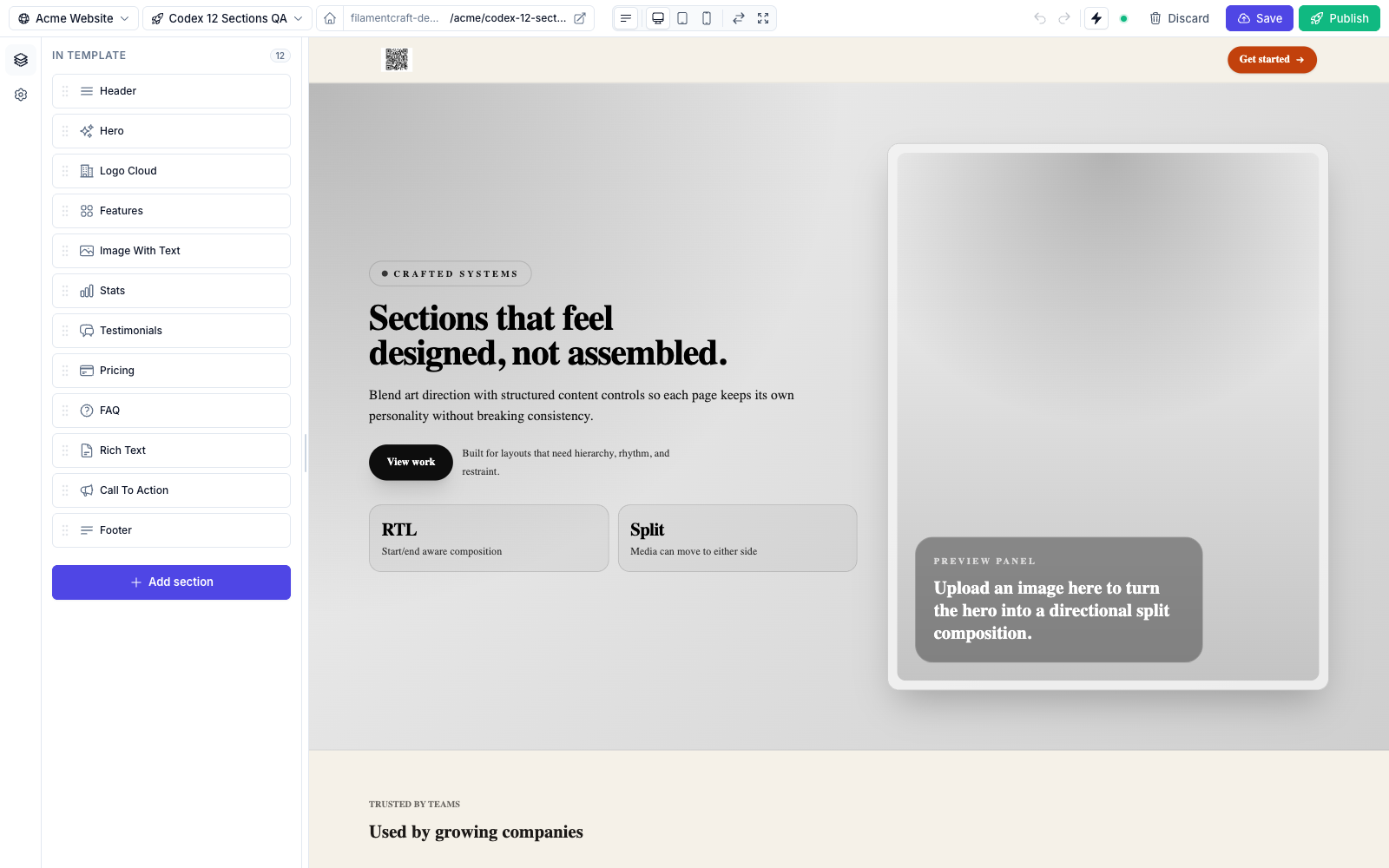
It ships 32 built-in sections (we counted src/Sections/Builtin), covering marketing, content and commerce, and a no-code section builder where users compose new section types from blocks and 24 curated layouts. Developers can still write their own sections in PHP and Blade.
The parts that are hardest to build yourself are the ones it spends most of its code on:
- Tenancy without a tenancy dependency. Sites belong to any owner model, and resolution works with Filament's own tenancy or none. The tenancy guide covers both the single-site and multi-tenant setups.
- Themes your users can change: color schemes, typography and fonts, plus a brand-kit lock for agencies.
- Multiple locales with RTL, where each locale is its own content slice.
- Server-rendered public pages with SEO fields, a sitemap and JSON-LD.
Installing it is four commands against our private Composer registry:
bash
composer config repositories.filamentcraft composer https://packages.filamentcraft.dev
composer config http-basic.packages.filamentcraft.dev your@email.com your-license-key
composer require filamentcraft/filamentcraft
php artisan filamentcraft:install
Public routing is off by default, because most hosts already own their front end. Set 'public_routes' => true in config/filamentcraft.php when you want FilamentCraft to serve published pages through a fallback route; your own routes always win over it. The details are in public routing.
When FilamentCraft is the wrong choice
Here is where we would send you elsewhere.
- Your developers edit every page. If no end user ever touches layout, the editor, themes and presets are weight you do not need. Use the Builder field.
- You have no Filament panel. FilamentCraft is a Filament plugin. A static marketing site with no admin does not need it, and neither does a Laravel app that has no plan to adopt Filament.
- Your public site is a separate JavaScript front end. FilamentCraft renders pages server-side in Blade. If Next.js or a mobile app owns rendering, a headless CMS is the better fit.
- You need it free or open source. FilamentCraft is paid. The full source lands in
vendor/and nothing is obfuscated, but it is not MIT. Fabricator is. - You want pixel-level freeform design. Editors work with sections, blocks, layouts and theme tokens. That constraint is what keeps a client from breaking the site, but it is a constraint.
What it costs
From our pricing page: Single project is $49 with 12 months of updates, Studio is $149 for up to five production projects with 24 months of updates, and Agency is $399 for unlimited projects, including every tenant of your SaaS, with lifetime updates. Each is a one-time payment with a 14-day refund, and the licence is perpetual, so the last version you downloaded keeps running after the update window ends.
Compare that against the hand-built list in option 1. If your roadmap includes drafts, revisions, a live preview and per-tenant themes, the question is how many developer days those cost you, not whether $49 is more than zero.
A short decision table
- Developers edit, one site, Laravel renders: Builder field.
- Developers write blocks, you want routing and a page resource for free: Filament Fabricator.
- A separate front end renders the site: a headless CMS.
- Users or clients design pages, possibly per tenant, inside Filament: FilamentCraft.
If you are in the last group, start with getting started, or open the live demo, which is the full product with nothing removed and no signup.