
Appearance
A Filament media library scoped to each site, not each tenant
A Filament media library for a website builder has to answer one question before any other: whose images are these? In FilamentCraft the answer is the Site, not the Filament tenant, because one tenant can own several sites and each site needs its own gallery. This post walks through the library we shipped in v1.37.1, and the three problems that decided how it is built.
What the Filament media library does
The FilamentCraft media library is a per-site gallery of uploaded images that every image field in the editor can pick from. Authors reach it two ways: a Media library button next to each image setting, and a Media gallery tab in the editor's icon rail for managing the whole collection.
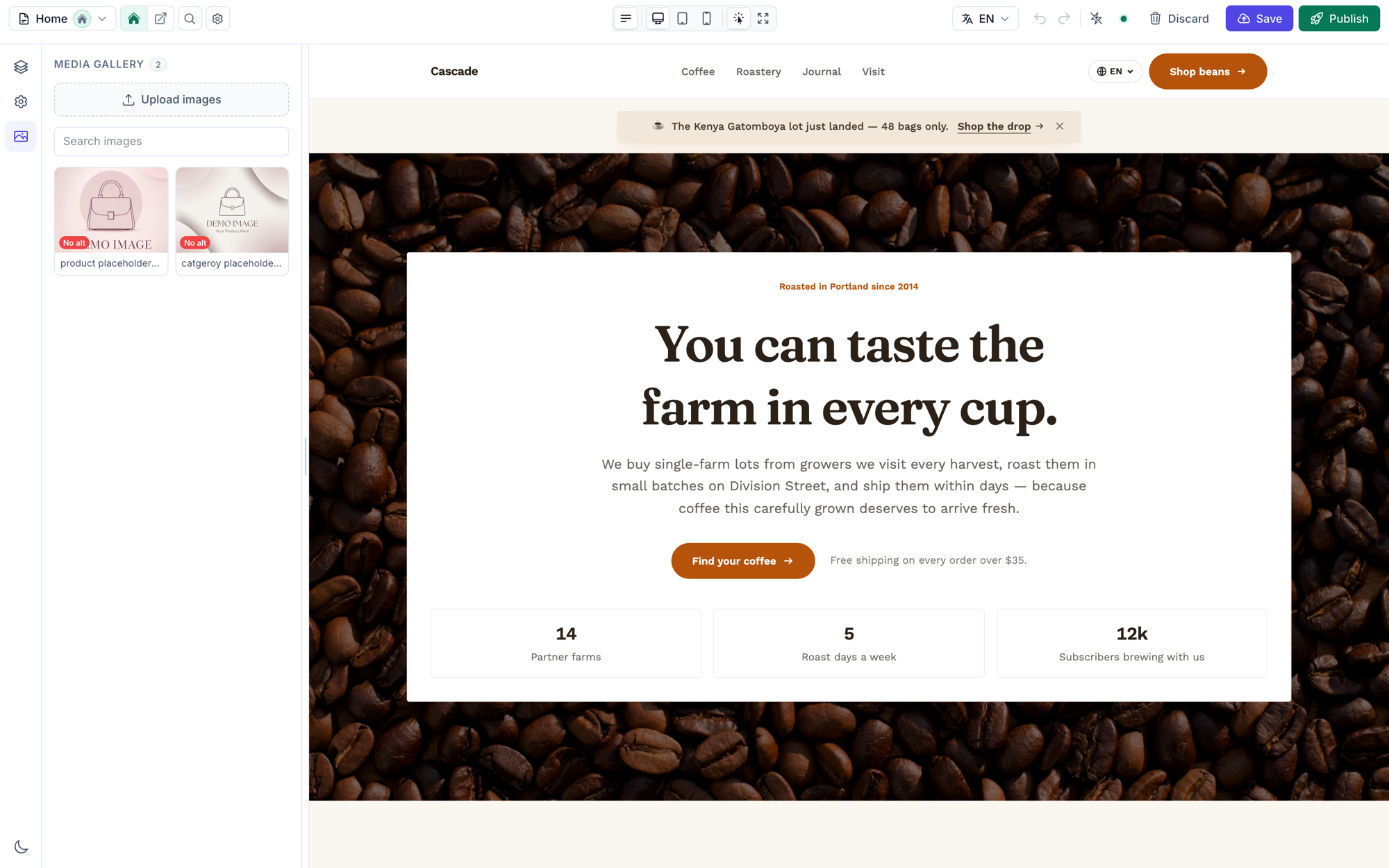
From either place an author can upload, search by title, file name or alt text, rename, write alternative text, and delete one image or a selection. The picker imports with the rules of the field that opened it: disk, directory, accepted MIME types, size limit and visibility all come from the Image setting, so an import through the picker obeys the same limits as a direct upload.
Nothing needs adding to your sections. Every Image setting gets the button, including the ones you declare yourself:
php
use FilamentCraft\Settings\Types\Image;

Image::make('bg_image')
    ->label('Background image')
    ->accept(['image/png', 'image/jpeg', 'image/webp'])
    ->maxSize(4096)
    ->editor();
Since v1.40.0 the no-code section builder uses the same picker, uploader and image editor. Both hosts share one trait, InteractsWithMediaLibrary, rather than two copies of the modal.
Why site-scoped instead of tenant-scoped
The obvious move for a Filament plugin is to scope media to Filament::getTenant(). Curator does that: its install command adds a tenant foreign key such as team_id, and its picker has a tenantAware() option that defaults to true.
That model breaks for us. In FilamentCraft a site's owner is a polymorphic relation, and the HasSite trait gives an owner a sites() relation, so one team can run a storefront and a separate marketing site from the same panel. A tenant-wide library would let an author working on the storefront browse, place and delete the marketing site's images.
So the filamentcraft_media table carries a site_id, and every query goes through the model's forSite() scope:
php
Media::query()
    ->forSite($site)
    ->orderByDesc('id')
    ->get();
That is the whole of MediaLibrary::forSite(), and registration, replacement and usage counts filter by site the same way. See the tenancy guide for how sites are resolved.
A library that fills itself
A media library that starts empty and asks authors to "add to library" first is one they route around by uploading straight into the field. We went the other way: every upload a section makes is registered as it is saved.
When the settings panel writes a section, it walks the compiled schema for image fields and calls MediaLibrary::register() for each path. Registration is idempotent: a path already in the site's library returns the existing row, so using the same photo in a hero and a product card still produces one entry. Two kinds of value never become rows. Livewire's pending livewire-tmp/ uploads are skipped, because the file is not stored yet. External URLs and absolute paths are skipped too, because the library would later offer to delete a file it does not own.
Sites that existed before the library would open an empty gallery, which reads as broken. One command backfills it from saved revisions and regions:
bash
php artisan filamentcraft:media-sync
php artisan filamentcraft:media-sync --site=3
v1.37.1 added the table, so run php artisan filamentcraft:upgrade first if you are coming from an older release.
The FileUpload preview we could not drive
Picking an image from the library sets the field's state on the server. We expected Filament's upload box to show the new picture, and it never did.
Filament renders its FileUpload component with wire:ignore, which tells Livewire to leave that part of the DOM alone. The upload box is a FilePond instance managed by Alpine, so a server-side write changes the value that gets saved but never the preview the author is looking at.
We stopped fighting it. SchemaCompiler now adds a small server-rendered strip under every Image field that shows the current file's thumbnail and name, and it owns the Media library and clear actions. Because it is ordinary Blade, it re-renders on every Livewire round trip like the rest of the form. The upload box keeps doing the one thing it is good at, which is accepting a new file.
Filament's image editor saves a new file
The second surprise came from crop and rotate. Filament's image editor does not overwrite the original on save. It uploads the edited image as a new file with a new random name, and the field's state moves to that path.
With naive capture, that meant every crop added a second gallery entry that looked like the first, and the title and alt text the author had written stayed on the old one. The fix depends on ordering. Before the panel writes new values into the draft, it reads the path each image field held a moment ago (previousImagePaths()). If a field went from one owned path to another, MediaLibrary::replace() moves the existing row onto the new file and refreshes its width, height and size. The id, title and alt text stay put, so the gallery shows one entry that changed. If the old path was never in the library, the new one is registered as usual.
Read the previous paths after the write and every one of them looks unchanged, so the duplicates come back. That is the line to check first if the gallery ever starts cloning edited images again.
Deleting an image that is still in use
Deleting a library entry deletes the file, and a published page that still points at it shows a broken image. So before a delete, the confirmation reports how many places still reference the file: saved template revisions, site regions such as the header and footer, and the unsaved draft open in the editor, which is where a just-placed image lives before anyone clicks save.
The count has one detail worth copying if you build something similar. Section content is stored as JSON, and json_encode escapes slashes, so a stored path looks like filamentcraft\/uploads\/… and a LIKE '%filamentcraft/uploads/…%' query never matches. usageCount() searches for the file's basename instead. Upload names are random 40-character strings, so a basename match is specific enough to count on.
The warning does not rewrite references. It is a prompt to replace the image at each placement first.
Alt text lives in two places on purpose
The library stores one default alternative text per image, and each placement keeps its own. Picking an image copies the library's alt text into the field only when that placement's alt text is empty; it never overwrites what an author already wrote. The same photo can then read differently in a hero and in a product grid, which is what alt text describing purpose in context needs. The media inputs reference covers the per-placement field, alt(false) for decorative images, and how the Blade component falls back to text your section derives.
The media library guide has the full author workflow, and the live demo has a store with a filled gallery you can open from the editor rail.