
Appearance
Build a Filament multilingual website with Arabic RTL
A Filament multilingual website with RTL support needs three things: content stored per language, a page that knows its own lang and dir, and SEO tags that tell search engines the translations exist. FilamentCraft stores each language as an independent content slice on the page, flips Arabic, Hebrew, Persian and Urdu to dir="rtl" automatically, and ships Blade components for hreflang and a visitor-facing switcher, with no translation package involved.
This tutorial builds an English, French and Arabic site step by step. It follows the Localization guide and the multi-locale site example, and ends with the RTL bugs we fixed along the way, because those are the parts you would otherwise find in production.
Step 1: declare the site's languages
Languages live on the Site model, not in a global config. A site has a default_locale (served when no locale is requested, and the fallback for anything untranslated) and a locales list of every language editors may author in. The default is always included.
You set both from the Sites resource form, or from inside the editor through the language switcher's Manage languages action. The picker is backed by FilamentCraft\Support\Locales, which offers common BCP-47 codes such as en, fr, ar and zh-CN with human labels from PHP's intl extension.
Once the site has more than one locale, the model answers the questions your own code will ask:
php
$site->localeCodes();     // ['en', 'fr', 'ar']
$site->hasLocale('ar');   // true
$site->isRtl('ar');       // true
Site::isRtlLocale('fr');  // false
Site::isRtlLocale() reduces a code to its language part first, so ar-MA and ar_EG both resolve to right-to-left. The RTL list in src/Models/Site.php is ar, he, fa, ur, ckb, dv, ps, sd, ug and yi.
Step 2: author content per locale
Each saved revision stores its content as a versioned payload with one bucket per locale. Page-level settings sit outside the buckets; sections and their order sit inside:
php
[
    'version' => 2,
    'settings' => [/* page-level settings (locale-independent) */],
    'locales' => [
        'en' => ['order' => [...], 'sections' => [...]],
        'fr' => ['order' => [...], 'sections' => [...]],
        'ar' => ['order' => [...], 'sections' => [...]],
    ],
]
Buckets are independent. Editing fr never touches en, and every mutation (add, move, duplicate, hide, settings) is scoped to the active locale. We chose this over per-field translations on purpose: an Arabic hero often wants different copy length, a different image, sometimes a different section order. A shared layout with translated strings would force every language into the English page's shape.
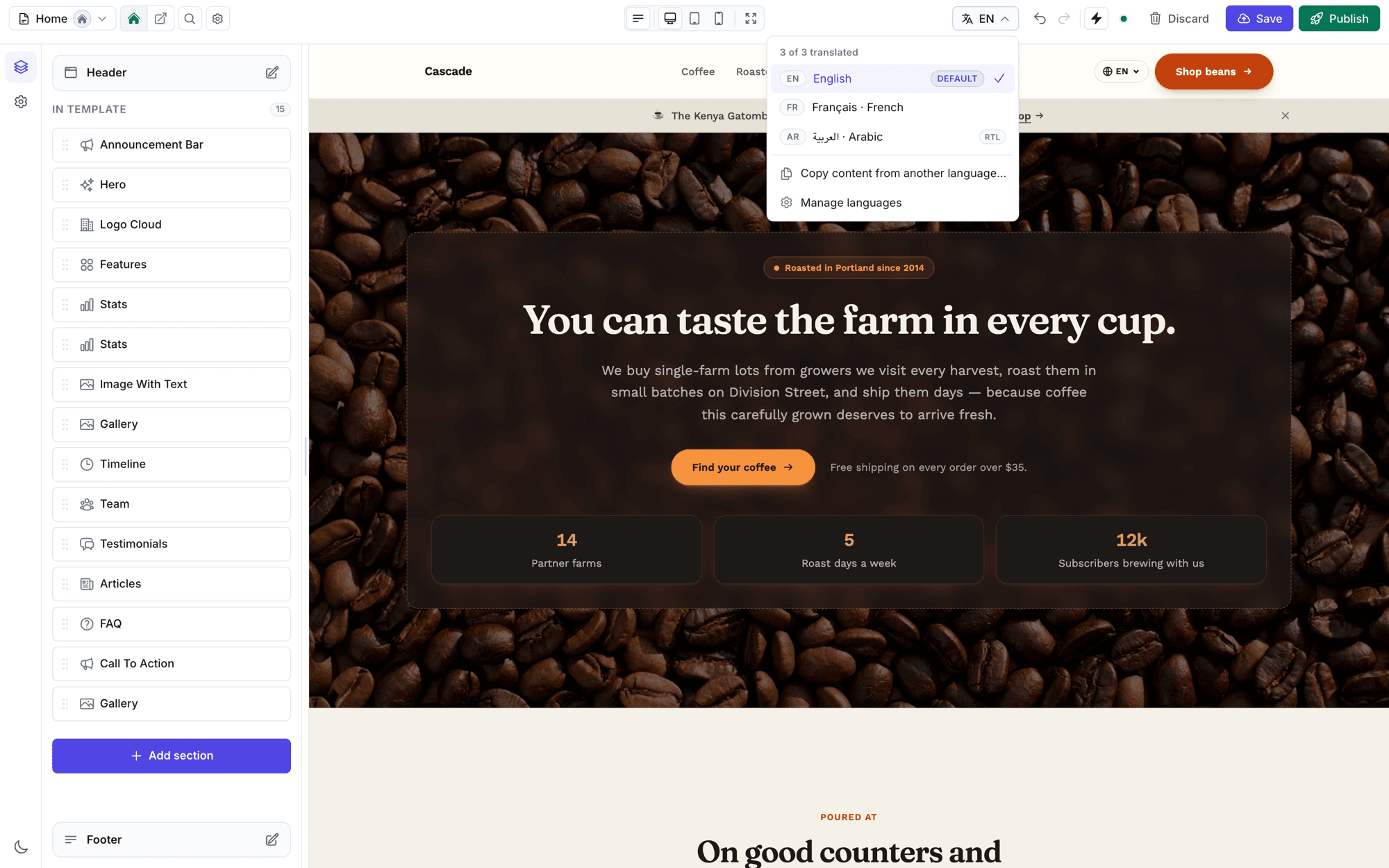
In the editor, the language switcher in the top bar reloads the canvas on the chosen locale's bucket. Opening a language with no content shows two choices: Copy from default, which duplicates the default layout for you to translate in place, or Start blank. The Copy content from another language… action copies from any language, not only the default, and every copy is a single undo away.
Headers, footers and announcement bars follow the same model. Since 1.24.0, regions are locale-bucketed exactly like page content, and the upgrade shipped a migration that moves each region's existing content into its site's default-locale bucket, so live sites kept rendering unchanged.
Step 3: render the right locale
TemplateRenderer picks the locale for a request in a fixed order: an explicit locale passed to the renderer or to <x-filamentcraft::layout :locale>, then the ?locale= query parameter, then the site's default_locale. A requested code is always clamped to one the site opted into, so ?locale=zz renders the default language instead of a blank page.
Untranslated content falls back too. If the ar bucket exists but is empty, the public site serves the default language's content for that page, while the editor shows the real, empty bucket so the translator can see the gap. Publishing half a translation never publishes a blank page.
One bug shaped how sections render. Before 1.18.0, __() calls in section views that omitted an explicit locale resolved against whatever the app booted with, so a ?locale=fr page could render English UI strings, and the per-locale fragment cache stored them that way. SectionRenderer now sets the app locale for the duration of every section render and restores it afterwards. The built-in sections' own strings ship in seven languages: ar, de, en, es, fr, ja and pt.
If your app owns the route, validate the segment yourself before rendering. This is the shape the demo uses:
php
$resolvedLocale = ($locale !== null && $site->hasLocale($locale))
    ? $locale
    : $site->default_locale;

app()->setLocale($resolvedLocale);

$html = $this->renderer->render($template, 'published', $resolvedLocale);
Step 4: hreflang and a language switcher
Published FilamentCraft templates get hreflang for free. The SEO pipeline emits one <link rel="alternate" hreflang="..."> per language plus an x-default, and /sitemap.xml carries the same alternates inline.
Pages you render yourself are different, including cart, checkout and account pages wrapped in <x-filamentcraft::layout>. The layout cannot know what a hand-built page's translations are, so it emits no alternates. Add them, and give visitors a switcher, in the same layout:
blade
<x-filamentcraft::layout :site="$site" :locale="$locale">
    @push('fc-head')
        <x-filamentcraft::hreflang :site="$site" :current="$locale" />
    @endpush

    {{ $slot }}

    <x-filamentcraft::locale-switcher
        :site="$site"
        :current="$locale"
        class="fixed bottom-5 end-5"
    />
</x-filamentcraft::layout>
The switcher renders a <nav> of native language names (Français, العربية), marks the current one with aria-current, puts the right hreflang and lang on each link, and flips itself to dir="rtl" when the active language is right-to-left. Both components render nothing for a single-locale site, so they are safe to leave in a layout unconditionally. Note the end-5 class: a logical property, so the switcher sits bottom-right in English and bottom-left in Arabic.
Step 5: choose a URL strategy
The default is ?locale=fr, which matches FilamentCraft's built-in catch-all routing described in public routing. If you want path prefixes like /acme/fr/about, register a resolver on the plugin:
php
use FilamentCraft\FilamentCraftPlugin;
use FilamentCraft\Models\Site;

FilamentCraftPlugin::make()
    ->localeUrlsUsing(function (Site $site, string $locale, bool $isDefault): ?string {
        $path = ltrim(request()->path(), '/');

        return $isDefault
            ? url("/{$site->slug}/{$path}")
            : url("/{$site->slug}/{$locale}/{$path}");
    })
Every consumer follows it: the built-in Header section's switcher, LocaleAlternate::forSite(), and through it both Blade components. Returning null for a locale falls back to the query-parameter strategy, so partial overrides work.
Two side effects are worth knowing before you ship. The Header section opts out of fragment caching once a resolver is registered, because its links become path-dependent. And /sitemap.xml drops its inline xhtml:link alternates, since your resolver reads the current request and the sitemap is a single request for /sitemap.xml itself. The per-page hreflang tags still carry the correct URLs.
On the routing side, Laravel compiles optional parameters nested, so "optional locale, then optional path" cannot be one route. The example uses two routes per site, a locale-prefixed one and a locale-less fallback that delegates with a null locale.
RTL pitfalls a Filament multilingual website hits
Setting dir="rtl" on <html> gets you most of the way, because the built-in section primitives use logical properties (inset-inline-end, margin-inline-start) and reflow on their own. The rest is a list of things that looked fine in English and broke in Arabic. Each one is now handled in resources/css/site.css or the section markup.
Fonts first. Latin webfonts ship no Arabic or Hebrew glyphs, so every font stack ends in var(--fc-font-script). In LTR documents that is sans-serif; under [dir="rtl"] it becomes a list of script-capable system faces starting with "Noto Sans Arabic". Your theme's Latin font stays first and the browser picks up Arabic glyphs from the tail.
Letter-spacing is the subtle one. Arabic, Persian and Urdu are cursive, and tracking severs the joins between letters. text-transform: uppercase means nothing in those scripts either. So RTL documents reset both on headings, paragraphs, buttons, eyebrows and stat numbers:
css
[dir="rtl"] :where(.fc-body, .fc-dynamic) :is(h1, h2, h3, h4, h5, h6, p, li, a, span, button, .fc-eyebrow, .fc-btn, .fc-stat-number, .fc-filter__title) {
    letter-spacing: normal;
    text-transform: none;
}
Direction-bearing decoration is the third class of bug. The eyebrow hairline gradient runs to left under RTL (fixed in 1.15.0). Carousel arrows were hard-coded left and right, so on Arabic sites they pointed against the already RTL-aware scroll direction; 1.28.2 mirrors the icon with transform: scaleX(-1). If you write custom sections, the same rule applies: any icon that means "next" or "back" needs to flip, and any gradient with a direction needs an RTL counterpart.
Labels count too. In 1.33.0 the Arabic editor showed two identical المظهر groups, one for a section's own style and one for the new look knobs. The knob group is now الطابع. Worth checking your own Arabic translations for the same kind of collision when two English words map to one Arabic one.
For the complete wiring, including the tenant-prefixed routes and the controller entry points, read the multi-locale site example. Or try the editor in the live demo.