
Appearance
Localization & RTL
A single page is authored once per language, each language kept as an independent content slice — so your French hero can have a different layout, different sections, and different copy from your English one, with neither leaking into the other. Right-to-left rendering and hreflang tags are handled for you. No translation package required.
The per-locale content model
A Site declares the languages it serves:
default_locale— the language served when no locale is requested, and the fallback for any page a translator hasn't filled in yet.locales— every language editors may author in. The default is always included.
Each saved revision stores content as a versioned payload keyed by locale:
php
[
    'version' => 2,
    'settings' => [/* page-level settings (locale-independent) */],
    'locales' => [
        'en' => ['order' => [...], 'sections' => [...]],
        'fr' => ['order' => [...], 'sections' => [...]],
        'ar' => ['order' => [...], 'sections' => [...]],
    ],
]
Buckets are independent: editing fr never touches en. Mutations (add / move / duplicate / hide / settings) are always scoped to the active locale.
Adding languages to a site
Set the default and the active languages on the Site — either from the Sites resource form, or in the editor from the language switcher → Manage languages. The locale picker is backed by FilamentCraft\Support\Locales, which offers the common BCP-47 codes (en, fr, ar, zh-CN, …) with human labels via the PHP intl extension.
The editor language switcher
When a site has more than one locale, a language switcher appears in the editor top bar. It is a fully keyboard-accessible menu (Arrow keys, Home / End, type-ahead, Escape to close and return focus) and shows, at a glance, which languages are still untranslated:
- the active language is marked with
aria-currentand a check; - any language with no content yet is tagged Empty;
- a header counts how many of your languages are translated (
2 of 3 translated), and an amber pip on the trigger flags that some are still pending.
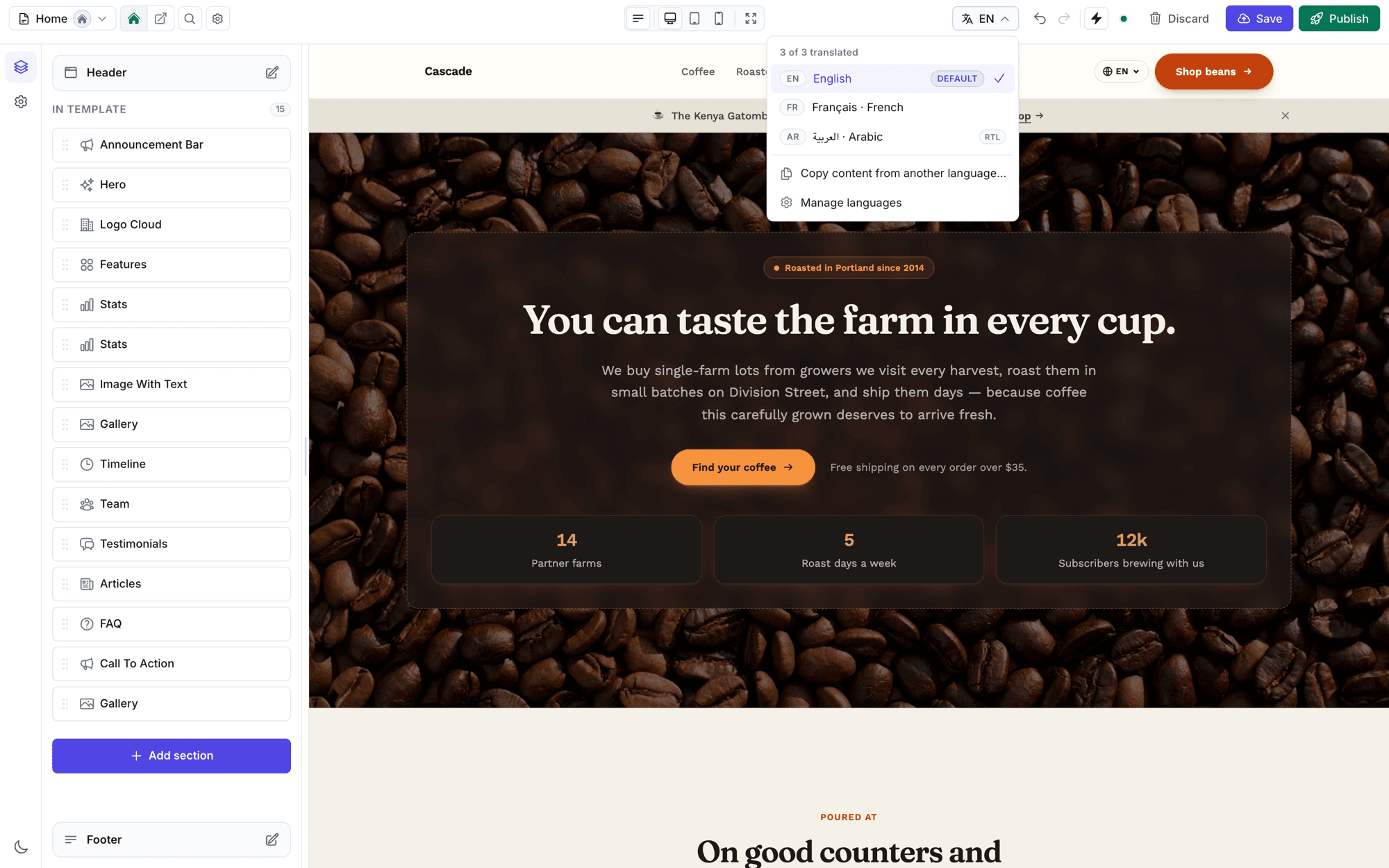
Right-to-left languages are tagged RTL in the menu — picking one flips the whole canvas, not just the text direction. See Right-to-left (RTL).
Switching language reloads the editor on that locale's bucket (the preview iframe is re-pointed so the canvas always mirrors the exact slice you're editing). If you have unsaved changes, you're asked to confirm before switching.
Seeding a new language
Open a not-yet-translated language and the canvas shows an onboarding card:
- Copy from default — duplicate the default language's layout, then translate in place. Best when the design is shared across languages.
- Start blank — design this language from scratch.
From the switcher's Copy content from another language… action you can copy from any existing language (not just the default), with a confirmation before it replaces the current language's content. Every copy is a single undo away.
How a locale is resolved when rendering
Public pages (the catch-all controller, <x-filamentcraft::layout> and Livewire pages using RendersInSiteShell) resolve the locale in this order:
- an explicit locale passed to the renderer /
<x-filamentcraft::layout :locale>; - the
?locale=query parameter (validated against the site's languages); - the language this visitor last picked on this site (see below);
- the site's
default_locale.
A requested locale is always clamped to one the site opted into — an unknown code falls back to the default rather than rendering a blank page, and is never remembered. The browser's Accept-Language is never consulted. If a page has a locale bucket but it's empty, the public site serves the default language's content for it (so an in-progress translation never publishes a blank page), while the editor shows the real (blank) bucket you're working on.
Remembering the visitor's language
A visitor who opens /?locale=en on an Arabic-default site stays in English when they follow a plain link — header navigation, product cards, your own host pages. The choice is stored in the session, keyed per site, so two sites on one domain keep separate choices. Requesting the default explicitly (?locale=ar) switches back.
It needs a session, so it works on routes in the web middleware group (the package's public routes already are) and silently does nothing elsewhere. The editor preview ignores it. Turn it off to go back to query-string-only resolution:
php
// config/filamentcraft.php
'localization' => [
    'remember' => env('FILAMENTCRAFT_REMEMBER_LOCALE', true),
],
While it's on, language switchers name every language in their links, the default included (?locale=en), so "switch back to the default" is distinguishable from "followed a plain link". This covers the built-in Header section and <x-filamentcraft::locale-switcher>; for alternates you build yourself, use LocaleAlternate::forSwitcher() rather than forSite(). A localeUrlsUsing() resolver still decides every URL it returns.
SEO is unaffected. Crawlers carry no session, so they always get the clean default URL; hreflang alternates and x-default keep the clean default URL; and the canonical names the language actually served, so a remembered English page on / canonicalises to ?locale=en. Fragment caches are keyed by the resolved locale, so one visitor's choice never reaches another's page. Only a full-page cache in front of the app (a CDN caching HTML for visitors with a session cookie) would need to vary on the session. Flush the fragment cache after toggling remember, since cached headers hold the old switcher links.
Switchers inside Livewire components
A switcher re-rendered by a Livewire action would otherwise point at /livewire/update. LivewireSection and RendersInSiteShell pin the page URL the component was mounted on, and the default URL builder uses that instead. For your own Livewire components, add the FilamentCraft\Livewire\Concerns\PinsPageUrl trait.
Sections render in the requested locale
SectionRenderer sets the app locale for the duration of every section render and restores it afterwards, so __() calls inside section views resolve against the requested locale — and per-locale fragment caches store the right strings instead of freezing whatever language the app booted with. The built-in sections' own UI strings ("Most popular", nav aria labels, cart labels, …) ship translated in seven languages (ar, de, en, es, fr, ja, pt).
Multilingual SEO: hreflang
On published FilamentCraft templates, hreflang is automatic — the SEO pipeline emits one <link rel="alternate" hreflang="…"> per language plus an hreflang="x-default", alongside the inline alternates in /sitemap.xml. You don't need to add anything.
Pages you render yourself are different — including pages wrapped in <x-filamentcraft::layout> (cart, checkout, account). The layout gives them the site's theme shell and site-level SEO defaults, but it can't know what a page's translations are, so it emits no alternates. Add them yourself:
blade
@push('fc-head')
    <x-filamentcraft::hreflang :site="$site" :current="$locale" />
@endpush
On a custom layout that doesn't wrap the FilamentCraft one, drop the same component straight into your <head>.
It emits one <link rel="alternate" hreflang="…"> per language plus an hreflang="x-default" pointing at the default language, and renders nothing for single-locale sites.
A visitor-facing language switcher
Give visitors a way to change language with the storefront switcher:
blade
<x-filamentcraft::locale-switcher :site="$site" :current="$locale" />It renders an accessible <nav> of native language names (Français, العربية, 日本語), marks the current one with aria-current, carries the right hreflang/lang on each link, flips itself to dir="rtl" when the active language is right-to-left, and is styled entirely from your theme tokens via the .fc-locale-switcher primitive. It also renders nothing for single-locale sites.
URL strategies
Everything defaults to a query-parameter strategy (?locale=fr), matching FilamentCraft's built-in catch-all routing — including the built-in Header section's language switcher. If you own your routing and prefer path-prefixed URLs (/fr/about) — the SEO-recommended approach — register a locale URL resolver on the plugin:
php
use FilamentCraft\FilamentCraftPlugin;
use FilamentCraft\Models\Site;

FilamentCraftPlugin::make()
    ->localeUrlsUsing(function (Site $site, string $locale, bool $isDefault): ?string {
        $path = ltrim(request()->path(), '/'); // strip any existing prefix as needed

        return $isDefault
            ? url("/{$site->slug}/{$path}")
            : url("/{$site->slug}/{$locale}/{$path}");
    })
Every consumer follows it automatically: the built-in Header section's switcher, LocaleAlternate::forSite(), and therefore the <x-filamentcraft::hreflang> and <x-filamentcraft::locale-switcher> components. Return null for a locale to fall back to the query-parameter strategy.
Two things change once a resolver is registered:
- The Header section opts out of fragment caching, because its switcher links become path-dependent.
/sitemap.xmldrops its inlinexhtml:linkalternates. Your resolver reads the current request, and the sitemap is a single request that would build every alternate from/sitemap.xmlitself. The per-pagehreflangtags still carry the correct URLs, which is what search engines read anyway.
For one-off cases you can still build alternates by hand with a per-call builder:
php
use FilamentCraft\Support\LocaleAlternate;

$path = ltrim(request()->path(), '/'); // strip any existing locale prefix as needed

$alternates = LocaleAlternate::forSite(
    $site,
    currentLocale: $locale,
    urlFor: fn (string $code, bool $isDefault): string => $isDefault
        ? url("/{$site->slug}/{$path}")
        : url("/{$site->slug}/{$code}/{$path}"),
);
Then pass them to either component:
blade
<x-filamentcraft::hreflang :alternates="$alternates" />
<x-filamentcraft::locale-switcher :alternates="$alternates" />
LocaleAlternate::forSite() returns one entry per site language with its url, native label, and current / rtl / isDefault flags — so you never re-derive the language list, labels, or text direction by hand.
See the multi-locale site example for a complete host application wiring locale-prefixed routes end to end.
Right-to-left (RTL)
RTL is automatic. The rendered <html> carries the correct lang and dir for the served locale, and Site::isRtl() / Site::isRtlLocale() expose the same decision to your own templates. Arabic, Hebrew, Persian and Urdu (and their regional variants) resolve to dir="rtl"; everything else to ltr. The storefront switcher mirrors that automatically, and the built-in section primitives use logical properties so they reflow without extra work.
Worked example
blade
{{-- A storefront layout serving per-locale content with full multilingual SEO --}}
<x-filamentcraft::layout :site="$site" :locale="$locale">
    @push('fc-head')
        <x-filamentcraft::hreflang :site="$site" :current="$locale" />
    @endpush

    {{ $slot }}

    <x-filamentcraft::locale-switcher
        :site="$site"
        :current="$locale"
        class="fixed bottom-5 end-5"
    />
</x-filamentcraft::layout>