
Appearance
Laravel CMS SEO: llms.txt, sitemaps and AI crawler rules
Laravel CMS SEO usually means a pile of packages: one for meta tags, one for the sitemap, a hand-written robots.txt, and nothing at all for llms.txt or AI crawlers. FilamentCraft ships all of it for the pages you build in the Filament editor, and most of it needs no configuration: every published page gets a title, description, canonical, Open Graph and Twitter tags, hreflang alternates and JSON-LD, and each site gets /sitemap.xml, /robots.txt, /llms.txt and IndexNow pings on publish.
This post walks through what the editor exposes, what renders by default, and the few places where we made a deliberate call you might disagree with.
Why server rendering comes first
Published pages are rendered on the server with no client-side JavaScript. That matters more than any meta tag. Googlebot runs JavaScript on a delay, and most AI crawlers do not run it at all, so a page builder that hydrates content in the browser hands them an empty shell.
With FilamentCraft, GPTBot, ClaudeBot and PerplexityBot see the full page on the first request. Everything below is layered on top of that.
What every published page gets
The head of each published page is built by one class, FilamentCraft\Seo\SeoResolver, and every tag flows through it. The SEO guide lists the full set:
- A per-page
<title>and<meta name="description"> - A self-referential
<link rel="canonical"> - Open Graph tags, including
og:localeplus anog:locale:alternatefor each other language - A
twitter:card, using the large image variant when a share image is set hreflangalternates for every locale a multi-locale site serves, withx-default- JSON-LD:
WebPageeverywhere,WebSiteandOrganizationon the homepage,BreadcrumbListfor nested slugs, and section-driven types such asFAQPagefrom an FAQ section orLocalBusinessfrom a Locations section
Keeping it all in one resolver was a lesson from the release that introduced it (1.20.0). When head output is assembled in several places, the canonical and og:url drift apart the first time someone changes routing. With a single chokepoint, a custom URL resolver changes all of them at once.
The SERP preview and per-page settings
In the editor, the Settings cog in the topbar opens SEO, a modal with two tabs. The Search engine tab shows a Google-style preview that updates as you type, with character counters against the usual lengths (about 60 for the title and 155 for the description).
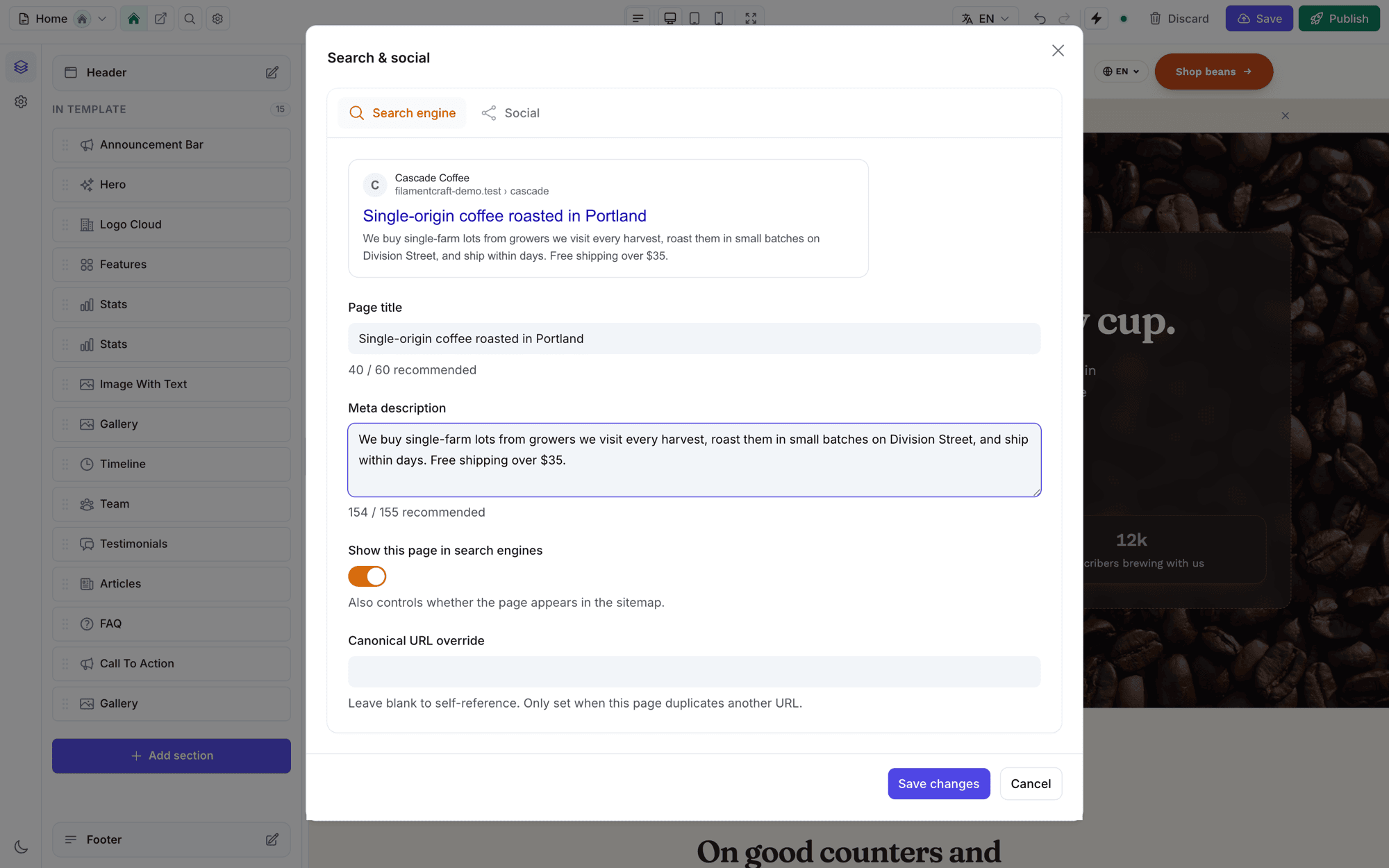
The same tab has a canonical URL override for the rare page that duplicates another URL, and one indexing switch, Show this page in search engines. That switch controls both the noindex robots meta and whether the page appears in the sitemap. We made it a single toggle on purpose: a page marked noindex but still listed in the sitemap sends search engines mixed signals, and two separate switches make that state easy to reach.
All per-page SEO is stored per locale in templates.seo_json, so translating a page also means translating its metadata.
The social card
The Social tab previews the share card. By default it reuses the search title and description; uncheck "Use the search title & description for social too" to write separate Open Graph copy. You can upload a per-page share image or fall back to the site default.
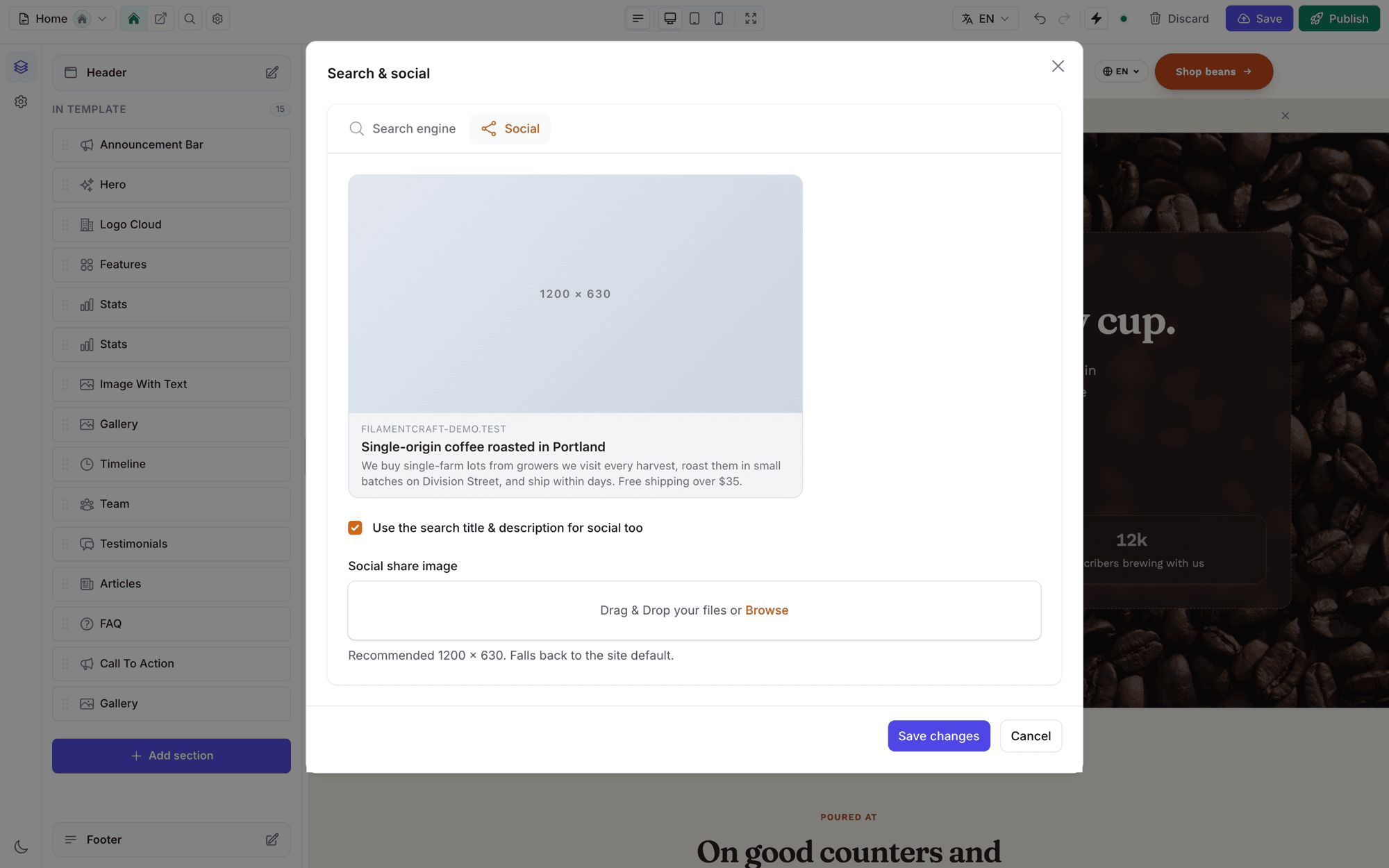
Site-wide defaults live under Site settings → Search & AI: whether to append the site name to titles, a default description and share image, an organisation logo and social profile URLs (which become sameAs links in the Organization JSON-LD), and a site-wide Allow search engines to index this site switch for staging.
Slug changes and redirects
Slugs sit in Page settings, under the same cog. When you change one, the form offers Redirect the old URL to the new one, checked by default, which creates a 301. Chains are collapsed, so a page renamed three times still redirects its oldest URL in one hop.
Sitemap, robots.txt and llms.txt
When public routing is on, FilamentCraft registers four per-site files: /sitemap.xml, /robots.txt, /llms.txt and /{key}.txt for IndexNow verification. Each one can be turned off in config/filamentcraft.php:
php
'seo' => [
    'sitemap' => true,
    'robots_txt' => true,
    'llms_txt' => true,
    'indexnow' => [
        'enabled' => true,
        'endpoint' => 'https://api.indexnow.org/indexnow',
    ],
],
The sitemap lists published, indexable pages. Its <lastmod> comes from each page's published revision timestamp, never now(), and it leaves out <priority> and <changefreq> because Google ignores both. For URLs FilamentCraft does not own, such as products or articles, append them with a closure:
php
use FilamentCraft\Seo\SitemapBuilder;

SitemapBuilder::appendUsing(fn ($site) => Product::query()
    ->get()
    ->map(fn ($p) => [
        'loc' => route('products.show', $p),
        'lastmod' => $p->updated_at->toAtomString(),
    ]));
One trap catches almost everyone. A fresh Laravel app ships a static public/robots.txt, and the web server serves it before the request reaches Laravel. Delete it (and any stray public/sitemap.xml), or the dynamic versions never answer.
An honest note on llms.txt
FilamentCraft\Seo\LlmsTxt builds an llmstxt.org index: the site name, the default description as a summary, and a list of published default-locale pages. A site set to noindex lists no pages, matching robots.txt.
Our docs say plainly that, as of 2026, no major AI provider has committed to reading llms.txt. We ship it because it costs nothing and does no harm, and we would rather tell you that than sell it as a ranking lever. What AI crawlers read is your server-rendered HTML.
An AI crawler policy that keeps you in AI answers
The AI crawler policy separates bots that put you in AI answers from bots that collect training data, and it only ever blocks the second group. The policy matrix lives in FilamentCraft\Seo\AiCrawlers::MATRIX, where each user agent is tagged search, user or training.
Answer bots such as OAI-SearchBot, ChatGPT-User, Claude-SearchBot, PerplexityBot and Googlebot are never disallowed by any preset. Blocking them removes the site from AI search, and a site owner who ticks "block AI" rarely means that. Training bots (GPTBot, ClaudeBot, Google-Extended, CCBot and others) are the lever, because blocking them does not remove existing citations.
There are three presets:
| Preset | Effect |
|---|---|
| Maximum AI visibility (default) | Everything allowed except Bytespider |
| Protect content from training | Training bots blocked, answer bots allowed |
| Custom per-bot rules | You pick which training crawlers may access the site |
Bytespider is blocked under every preset. The source comment gives the reason: it has documented robots.txt non-compliance and brings no answer-surface benefit. The policy renders into robots.txt with a Sitemap: line.
IndexNow on publish
When you publish, FilamentCraft\Seo\IndexNow submits the page URL to the IndexNow endpoint, which Bing, Yandex, Naver and Seznam consume. Google does not use IndexNow, so it adds to the sitemap rather than replacing it.
A few design choices are worth knowing. The site key is 32 hex characters, generated on first use and served at /{key}.txt. The request has a three-second timeout, errors are swallowed, and inside a web request the POST is deferred with app()->terminating() so the Publish click never waits on a third-party API. It does not use the queue, because a package cannot assume the host runs a worker. URLs on localhost, 127.0.0.1 or a host without a dot are filtered out, so a plain local publish sends nothing.
Checking it with doctor
php artisan filamentcraft:doctor includes an SEO group: pages missing a description, duplicate titles, a missing default share image, sites set to noindex, and whether the public SEO files are being served. It accepts --json for CI and --strict to fail on warnings, which makes it a reasonable pre-deploy step for multi-tenant installs where one tenant's staging switch can quietly stay on.
The SEO guide covers the remaining extension points, including pushing your own tags to the fc-head stack. To try the SEO modal on a real site, open the live demo.