
Appearance
AI Assistant
The assistant lives inside the editor. It writes a page (or a whole site) from a short brief, and it applies plain-language requests — "change my main color to deep teal", "add a FAQ about shipping after the features", "make this section punchier" — as ordinary, undoable edits to the draft. Nothing is published; everything lands in the draft the editor already shows.
Open it from the Assistant button in the topbar, with ⌘J, or from the command palette.

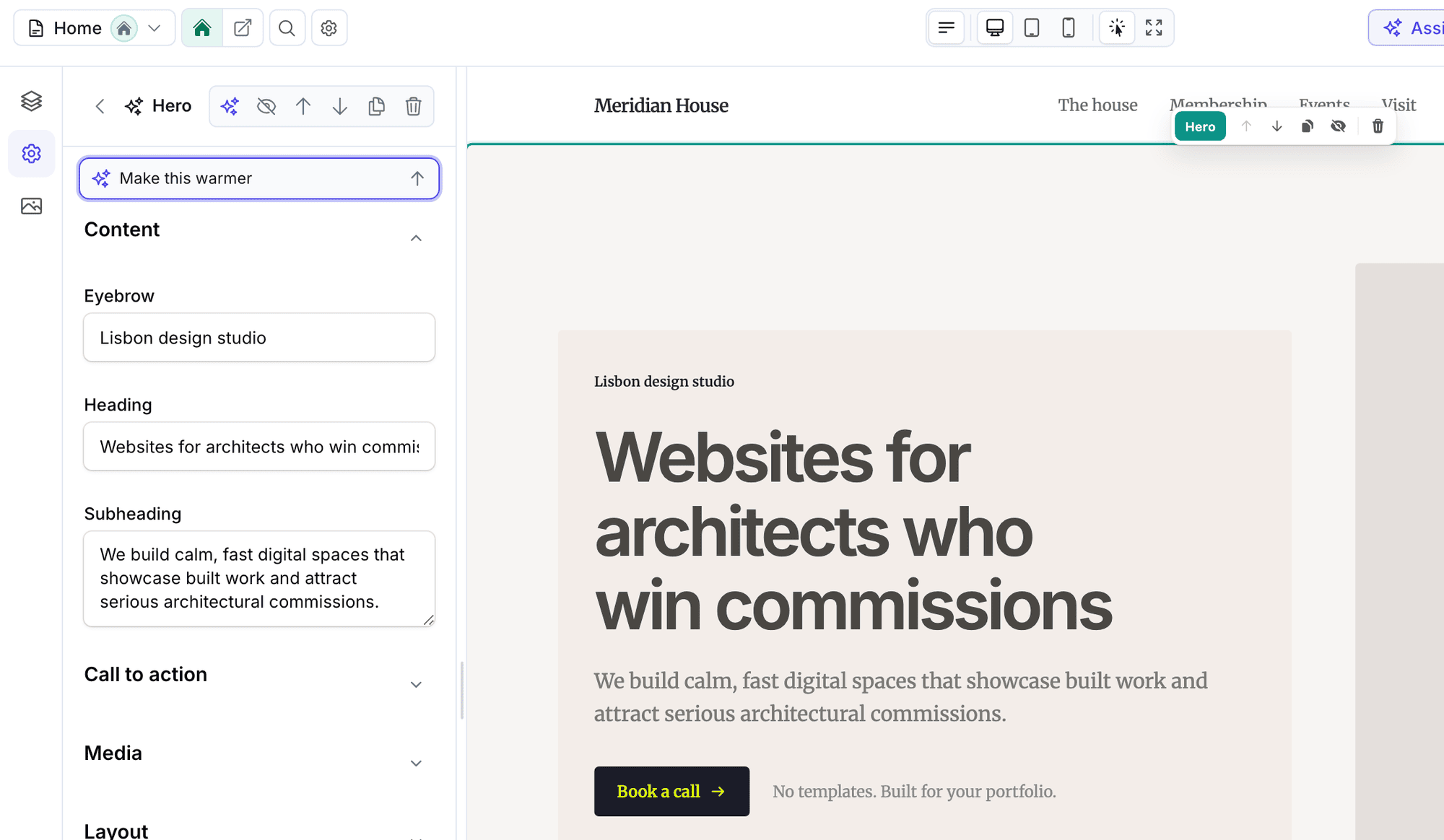
A selected section adds two shortcuts. The sparkle button in its header opens the Ask tab aimed at that section. The Ask AI to change this section… bar at the top of its settings panel sends the request straight away and closes the slide-over again once the change is applied.
Installation
The assistant runs on the official laravel/ai SDK, which is an optional dependency (it needs PHP 8.3 and Laravel 12):
bash
composer require laravel/ai
php artisan vendor:publish --tag=filamentcraft-migrations
php artisan migrate
Then set a provider key. The default provider is Gemini:
ini
GEMINI_API_KEY=...Without the package or a key the editor simply doesn't show the Assistant button. Run php artisan filamentcraft:doctor if you expect it and it is missing.
Generate a page
The Generate tab is a three-step flow: a brief, a plan you can edit, then the written page.
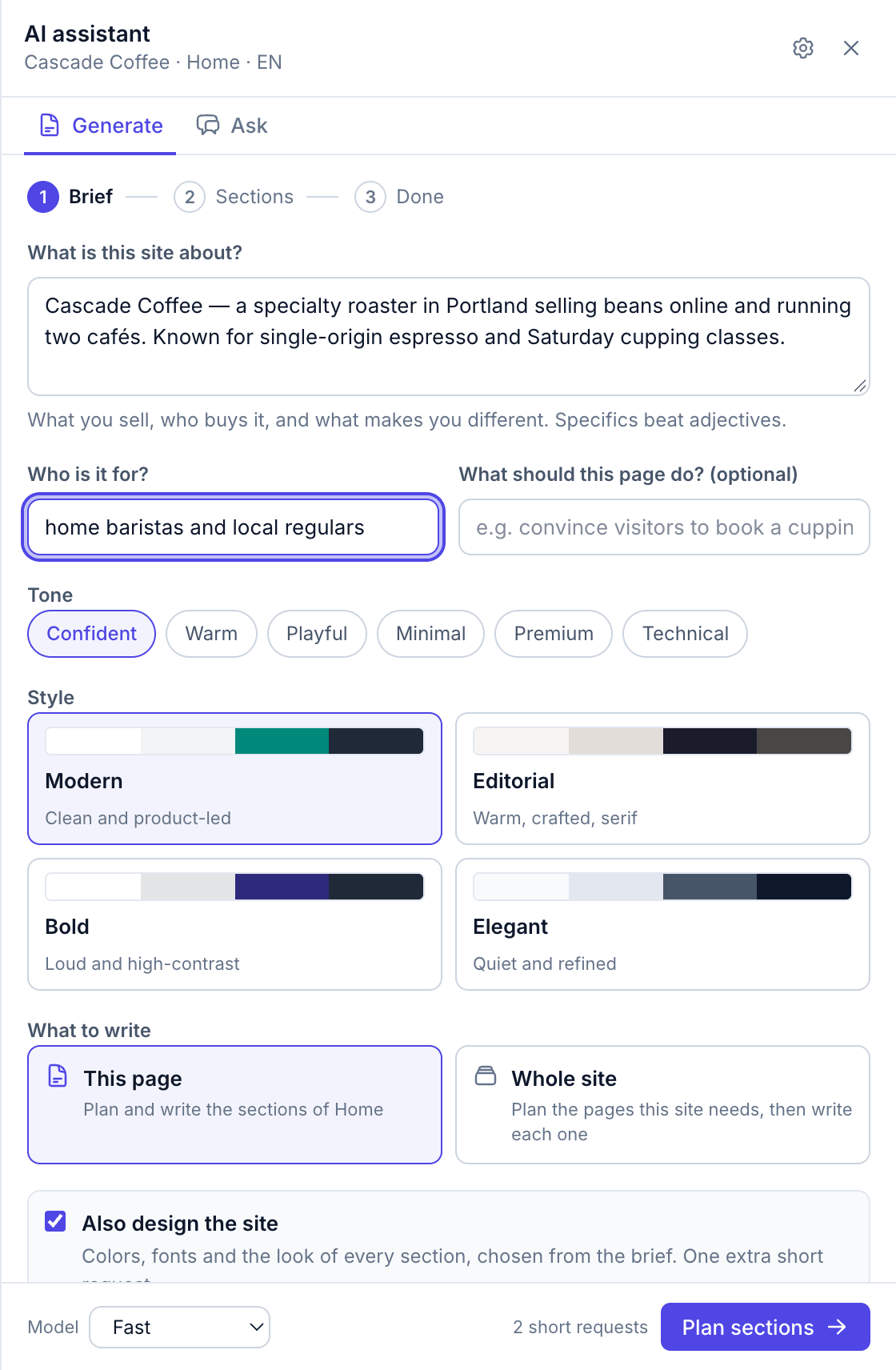
1. Brief. Describe the business, who it is for and, optionally, what this page should do. Pick a tone and one of the four style families. This page plans the current page; Whole site plans the pages the site needs and writes each one. Leave Also design the site on to have the assistant choose colors, fonts and the look of every section too, and choose whether the new sections replace the page's current ones or go below them.
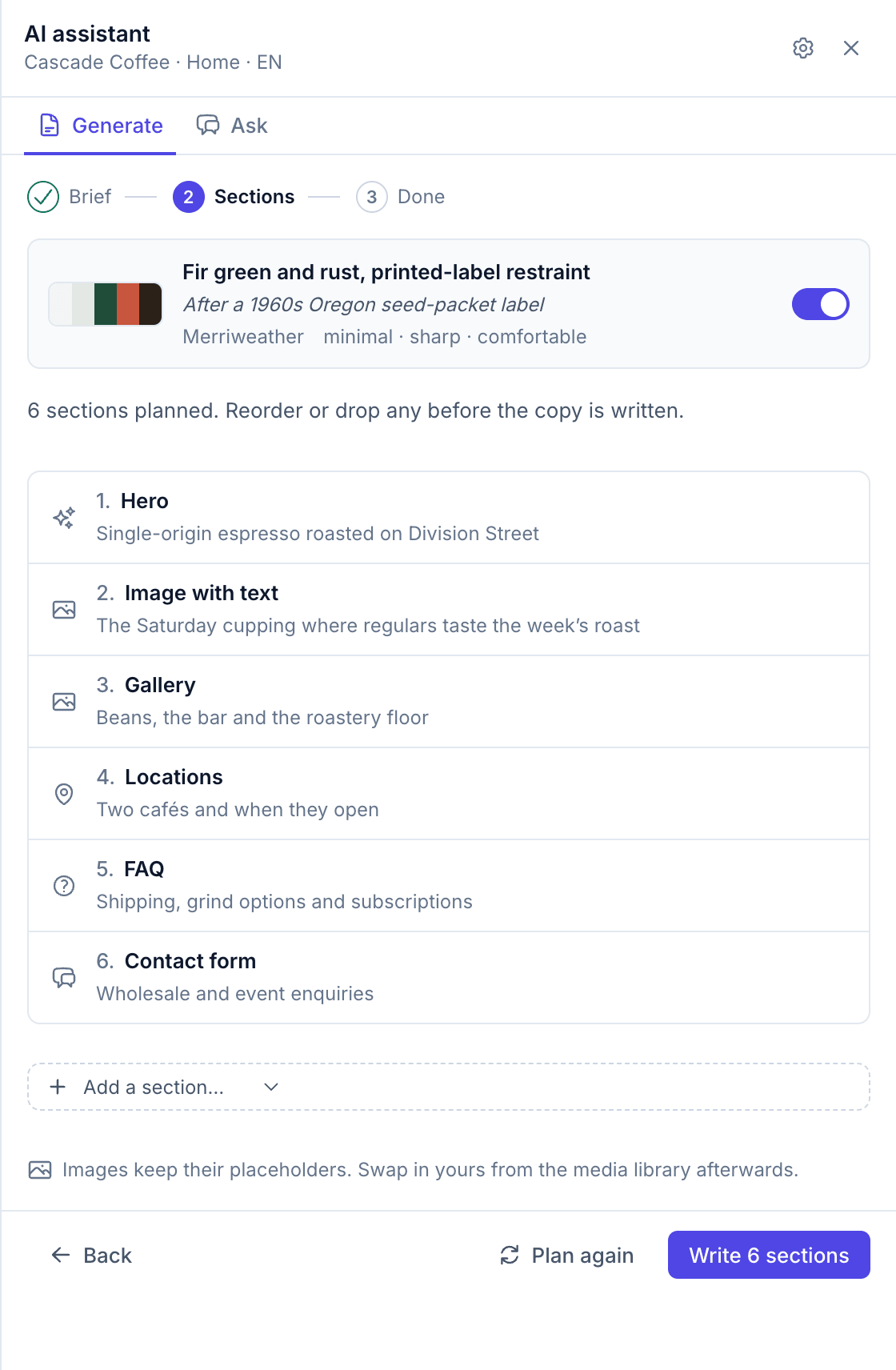
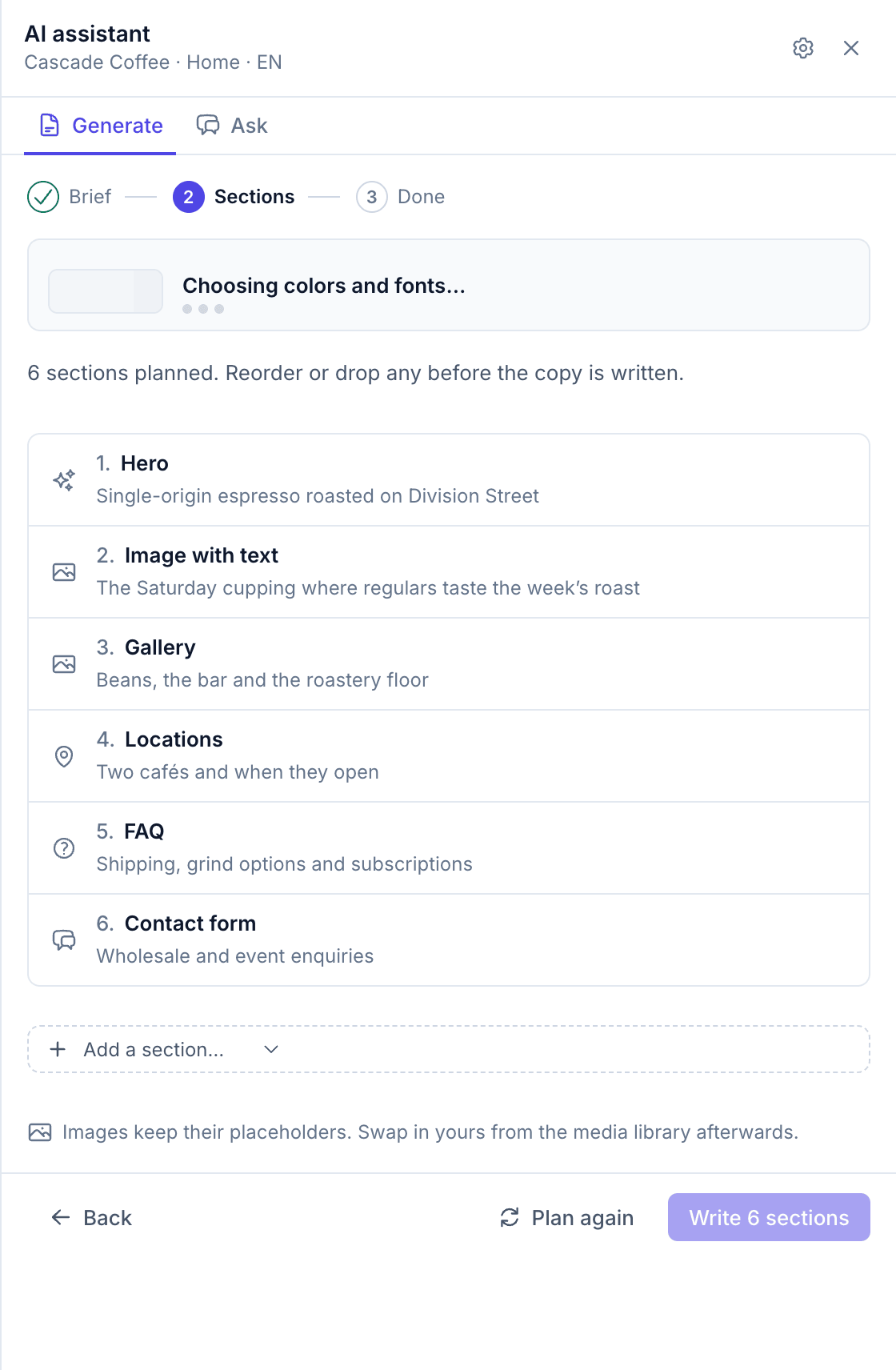
2. Sections. The plan lists every section with a one-line intent. Reorder, drop or add sections and retype any intent before copy is written. With design on, a card at the top shows the proposed palette, type pairing and look; its switch skips the design and keeps the site as it is. The design arrives a moment after the plan, and the write button waits for it. If the design call fails, the card says why and the pages are written on the site's current look.
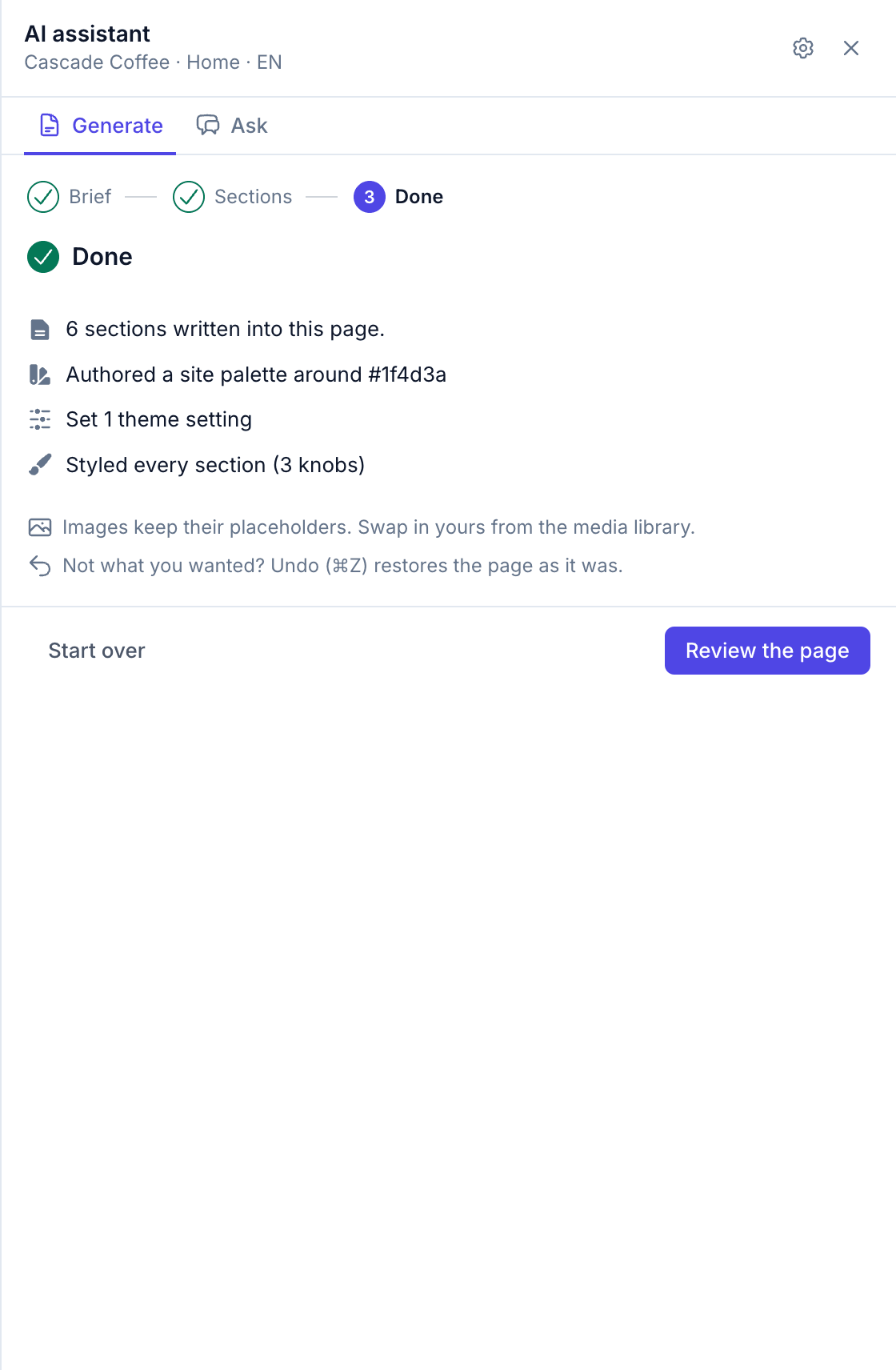
3. Done. The sections are written into the draft and the canvas shows them straight away. The summary lists what changed. Images keep their placeholders, and ⌘Z restores the page as it was.
A whole-site run writes one page per step and needs the editor tab to stay open. If the tab closes or a step fails, the pages already written stay as drafts; a failed page shows a Retry button.
Ask for changes
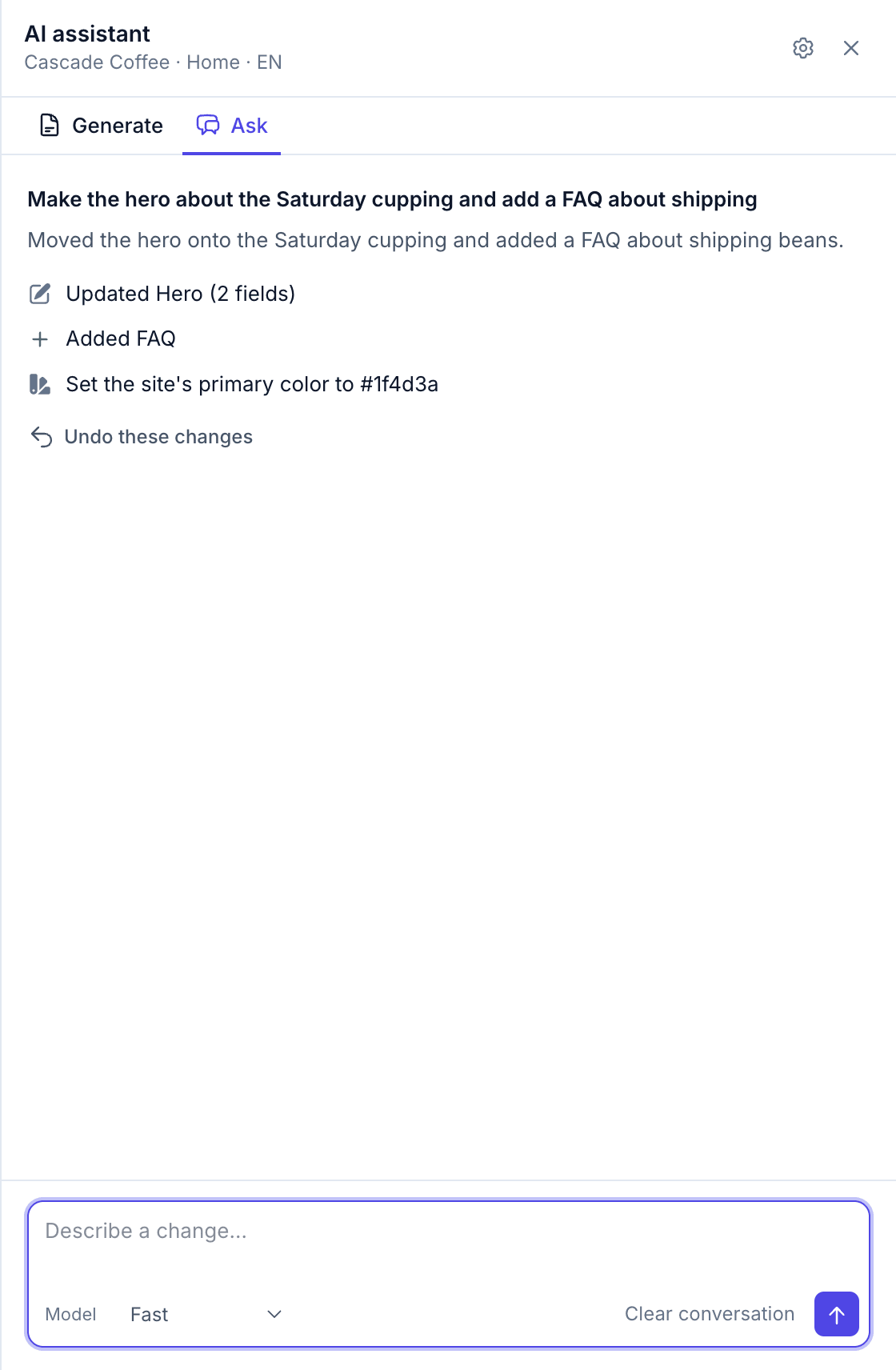
The Ask tab takes plain-language requests and keeps them as a log of edits: your request, the assistant's one-line reply, then one row per change. A row for a section selects that section in the canvas when you click it. The last three exchanges go with each request, so a follow-up such as "shorter" knows what it refers to, and Undo these changes reverts the page edits of the latest one. Edits you make in the settings panel while a request is running are kept.
While a request runs, the entry shows how many seconds it has taken, and after eight seconds says the provider is slow. A failed request stays in the log with Try again.
How generation stays cheap
A page is written in three small calls instead of one large one:
- Plan — the model sees the section catalog as one purpose line per type and answers with an ordered list of types plus a twelve-word intent per section. The editor reviews the plan, can reorder, drop or add sections, and can retype any intent before copy is written.
- Design — the model sees the site's own schemes, its theme's settings (fonts included) and the style knobs the sections share, and answers with one direction: an existing scheme or a custom palette (
background,surface,primary,accent— text colors are derived for contrast), a type pairing, theme values such as radii and sizes, and the look every section starts from. The editor sees it as a card (swatches, fonts, note) with a switch to skip it. - Write — the prompt carries only the copy fields of the chosen types (headings, paragraphs, links, block text). Icons and images come from the preset of the style the editor picked; the model never sees or writes them.
A six-section homepage costs roughly 500–700 prompt tokens per step on a fast model. A whole-site generation adds one page-list call, then runs plan + write per page. Every model call of a generation is its own web request, the design call included, so progress is visible and no proxy timeout is hit. A lost response is safe: a retried tick finds the page it already wrote instead of creating it twice. The design is applied once, before the first page is written.
A custom palette is authored as a site scheme named ai-brand and made active; regenerating overwrites that one scheme instead of adding another. A model that is overloaded, rate-limited or silent hands the request to the next tier down (Advanced → Balanced → Fast, Fast → Balanced) within the same time budget, and is skipped for two minutes; so is a model that took more than 12 seconds to answer. The usage row records which model actually ran.
Requests ("Ask") are one call. The prompt opens with the site's name and the last brief written for it (business, audience, tone), so rewritten copy stays on-brand without re-entering it. The page follows as one line per section (id, type, writable field keys, its heading or title), with full current copy only for the section the editor has selected, then the last three exchanges. The model returns operations — update fields, add/move/hide/remove sections, switch the color scheme, recolor a token, change a theme setting — which are validated against the real field definitions before they touch the draft. Values that don't fit (an unknown enum member, a bad URL) are dropped, never stored. Adding sections triggers one extra write call, however many are added.
Images are left as placeholders for the editor to fill; the media library is one click away.
How it avoids generic output
Generated sites tend to look alike: a cream background, Inter and Playfair, an eyebrow over every heading, a stats row and three testimonials nobody gave. The prompts and the code behind them push the other way.
- Design starts from a scene, not a category. The model first writes who visits and where, names a real object or publication the look borrows from, and picks a colour strategy (restrained, committed, full or drenched) before choosing any colour. The reference appears on the design card.

- Fonts are chosen by voice. The model picks from a curated set of distinctive faces, each described by character ("sturdy newspaper grotesque", "chunky soft serif"), and the faces every generated site already uses are left out. A brand kit's font allow-list still wins, and monospace never reaches body text.
- Cream backgrounds are corrected. A background or surface in the cream, sand or beige band is moved to a near-neutral leaning toward the brand's own colour, keeping its lightness.
- Nothing is invented. Sections that need real numbers, quotes, clients or people are only planned when the brief gives them. Otherwise the copy uses bracketed placeholders such as
[Phone]or[Client name]for you to replace, and a link to an external site survives only when the brief names that site. - One eyebrow per page at most, feature cards get a real icon, and banned marketing phrases ("unlock", "seamless", "Learn more") stay out of the copy.
Your own prompts
Everything above is the default. You can add your own rules, replace the copywriting voice, or take the last word over every request, without forking anything.
House rules. Add rules for every task, or for one. They are appended after the built-in instructions under a "House rules from the site owner" heading, and the model is told they win:
php
use FilamentCraft\Ai\Enums\AiTask;
use FilamentCraft\Models\Site;

FilamentCraftPlugin::make()
    ->aiInstructions('Write British English. Never mention prices.')
    ->aiInstructions('Stay within our brand blues and never use a dark background.', AiTask::PlanDesign)
    ->aiInstructions(fn (Site $site, AiTask $task): ?string => $site->owner?->industry === 'health'
        ? 'Never make medical claims.'
        : null);
A closure receives the site and the task, so rules can follow a tenant's plan, industry or locale. Return null to add nothing. The tasks are PlanSite, PlanPage, PlanDesign, FillSections and Command (the Ask tab).
Your voice. Replace the built-in copywriting style with your own. The rules against invented facts and the output language always stay, so a custom voice cannot switch them off:
php
FilamentCraftPlugin::make()->aiVoice(<<<'VOICE'
    Voice: warm, plain and a little dry, like a good shopkeeper. Short sentences.
    Buttons say what happens next. No exclamation marks.
    VOICE);

// or per site, with the language the copy is written in
FilamentCraftPlugin::make()->aiVoice(fn (Site $site, string $language): string => $site->settings_json['ai_voice'] ?? 'Voice: plain and direct.');
The last word. aiPromptUsing() receives every finished request before it is sent and returns the one to send, so you can rewrite the instructions or prompt, or send a task to another tier:
php
use FilamentCraft\Ai\AiRequest;
use FilamentCraft\Ai\Enums\AiTier;

FilamentCraftPlugin::make()->aiPromptUsing(fn (AiRequest $request): AiRequest => $request->task === AiTask::PlanDesign
    ? new AiRequest($request->task, $request->instructions, $request->prompt, $request->schema, AiTier::Advanced, $request->site, $request->template)
    : $request);
Rules and a voice that don't need a closure can live in config instead:
php
'ai' => [
    'prompts' => [
        'voice' => 'Voice: dry, deadpan, Scandinavian.',
        'instructions' => [
            '*' => 'Write British English.',
            'plan_design' => 'Stay within our brand blues.',
            'fill_sections' => ['Mention free delivery over €40.', 'Sign off as "the Hearth team".'],
        ],
    ],
],
Config and plugin rules add up; a plugin voice wins over a config voice. Your customisation also reaches FakeAiRunner, so a test can assert on the exact prompt your rules produce:
php
FilamentCraftPlugin::make()->aiInstructions('Write British English.');
FakeAiRunner::install()->on(AiTask::PlanPage, ['sections' => []]);

// ... run a generation ...

expect(FakeAiRunner::current()->lastRequest()->instructions)->toContain('- Write British English.');
Configuration
php
'ai' => [
    'enabled' => env('FILAMENTCRAFT_AI_ENABLED', true),
    'provider' => env('FILAMENTCRAFT_AI_PROVIDER', 'gemini'),
    'models' => [
        'fast' => env('FILAMENTCRAFT_AI_MODEL_FAST', 'gemini-3.5-flash-lite'),
        'balanced' => env('FILAMENTCRAFT_AI_MODEL_BALANCED', 'gemini-3.6-flash'),
        'advanced' => env('FILAMENTCRAFT_AI_MODEL_ADVANCED', 'gemini-pro-latest'),
    ],
    'default_tier' => env('FILAMENTCRAFT_AI_DEFAULT_TIER', 'fast'),
    'allow_tier_choice' => true,
    'provider_options' => ['thinkingConfig' => ['thinkingLevel' => 'low']],
    'site_keys' => [
        'enabled' => env('FILAMENTCRAFT_AI_SITE_KEYS', false),
        'required' => env('FILAMENTCRAFT_AI_SITE_KEYS_REQUIRED', false),
    ],
    'usage' => ['track' => true, 'show' => true],
    'limits' => [
        'sections_per_page' => 9,
        'pages_per_site' => 6,
        'requests_per_minute' => 30,
        'monthly_tokens' => env('FILAMENTCRAFT_AI_MONTHLY_TOKENS'), // per site; null = no budget
    ],
    'timeout' => 45, // seconds of model time per web request, retries included — keep it under your web server's timeout
],
Every key also has a fluent counterpart on the plugin, so a panel provider can own it:
php
FilamentCraftPlugin::make()
    ->aiProvider('gemini')
    ->aiModels(fast: 'gemini-3.5-flash-lite', balanced: 'gemini-3.6-flash', advanced: 'gemini-pro-latest')
    ->aiDefaultTier(AiTier::Balanced, allowChoice: true)
    ->aiSiteKeys(enabled: true, required: false)
    ->aiUsage(track: true, show: false)
    ->aiProviderOptions(['thinkingConfig' => ['thinkingLevel' => 'low']])
    ->aiLimits(sectionsPerPage: 8, pagesPerSite: 5, requestsPerMinute: 20, monthlyTokens: 500_000)
    ->aiAccess(fn (?User $user, Site $site): bool => $user?->can('use-ai', $site) ?? false);
aiModel(AiTier::Advanced, '…') sets one tier, and ai(false) turns the assistant off.
- Tiers, not models. Editors only ever see Fast, Balanced and Advanced. Which model sits behind each tier is yours to decide; set
allow_tier_choicetofalseto hide the picker and always usedefault_tier. The tier an editor picks is remembered per site. - Provider. Any text provider
laravel/aisupports works — setproviderto itsconfig/ai.phpkey and point the tier models at that provider's model names.provider_optionsis merged into every request's generation config; the default keeps Gemini's reasoning tokens off the bill. - Site keys. With
site_keys.enabled, each site can store its own provider key from the assistant's settings panel. Keys are encrypted at rest on theSiterow and never read back into a form; the panel shows only the last four characters. The host key stays as a fallback unlesssite_keys.requiredis on, in which case a site without a key sees a prompt to add one. Because the key lives on theSite, it follows whatever tenancy the site already has. - Usage. With
usage.track, every call writes one row tofilamentcraft_ai_usages(site, template, user, task, tier, model, tokens, duration).usage.showsurfaces the month's totals inside the assistant; turn it off to keep the numbers to yourself while still recording them. TheFilamentCraft\Models\AiUsagemodel hasforSite()andthisMonth()scopes for your own reporting.
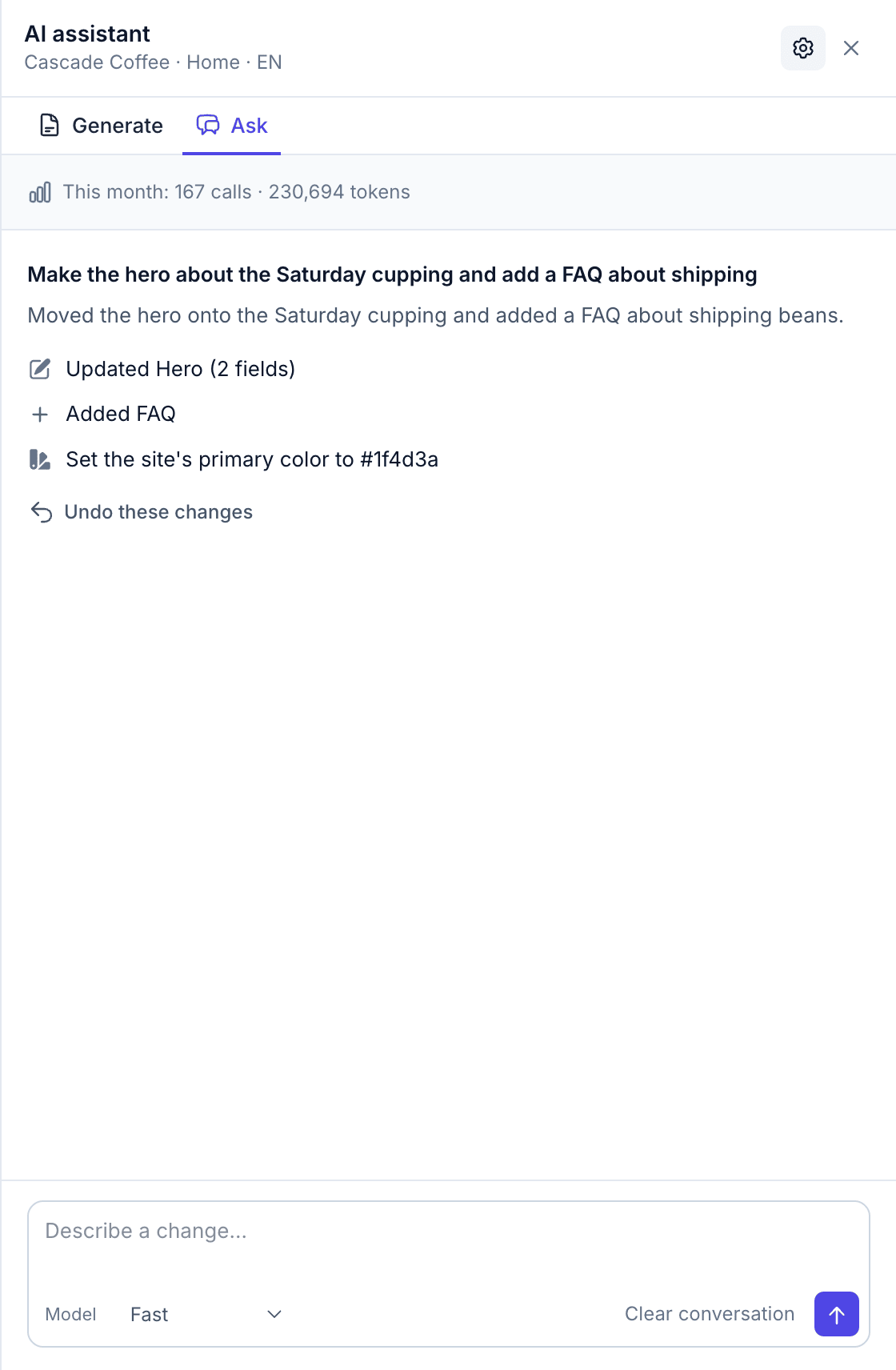
usage.show on, the settings panel shows the site's calls and tokens this month.Access and spending
By default every editor who can open the builder can use the assistant, and every call is paid with the host key unless the site has its own. Three controls keep that in check:
- Who.
aiAccess()takes a boolean or a closure that receives the user and the site being edited. Returnfalseand the Assistant button, the section shortcuts and the key settings disappear; direct calls are refused too. Use it for a Gate ability, a role or a plan entitlement. - How often.
limits.requests_per_minutecaps the model calls one user can start per minute (30 by default). A whole-site generation makes about two calls per page, so keep it above that. - How much.
limits.monthly_tokensis a token budget per site per calendar month. Once a site reaches it, the assistant shows a message instead of the forms until the month rolls over. The budget is counted from the usage table, so it needsusage.trackon;filamentcraft:doctorwarns when it is not.
For per-plan budgets, leave monthly_tokens unset and decide in aiAccess() with the AiUsage::query()->forSite($site)->thisMonth() totals.
Privacy
Each call sends the brief, the site name, the page's section types and copy (full copy only for the selected section) and, for Ask, the last three exchanges to the configured provider. Images, media files, form submissions and customer data are never sent. Mention the provider in your own privacy notice if your editors are not your own team.
Undo
Page edits — generated sections, rewritten copy, added or moved sections — are one undo step (⌘Z, or the Undo these changes button under the reply). Site-wide changes (the authored palette, color scheme, scheme tokens, fonts and theme settings) apply to the site immediately, the same way the settings panel does, and are not part of the page undo stack.
Testing your own integration
Bind FilamentCraft\Ai\Testing\FakeAiRunner in tests and queue answers per task:
php
use FilamentCraft\Ai\Enums\AiTask;
use FilamentCraft\Ai\Testing\FakeAiRunner;

FakeAiRunner::install()->on(AiTask::Command, [
    'reply' => 'Done.',
    'ops' => [['op' => 'set_color_scheme', 'scheme' => 'dark']],
]);
No test ever reaches the SDK; the fake also records every request so you can assert on the prompt that was built.