
Appearance
Text Inputs
Four types cover free-form text and numbers: Text, Textarea, Number, and Range. All four use the lazy live(onBlur: true) update mode — the preview refreshes when the field loses focus, not on every keystroke.
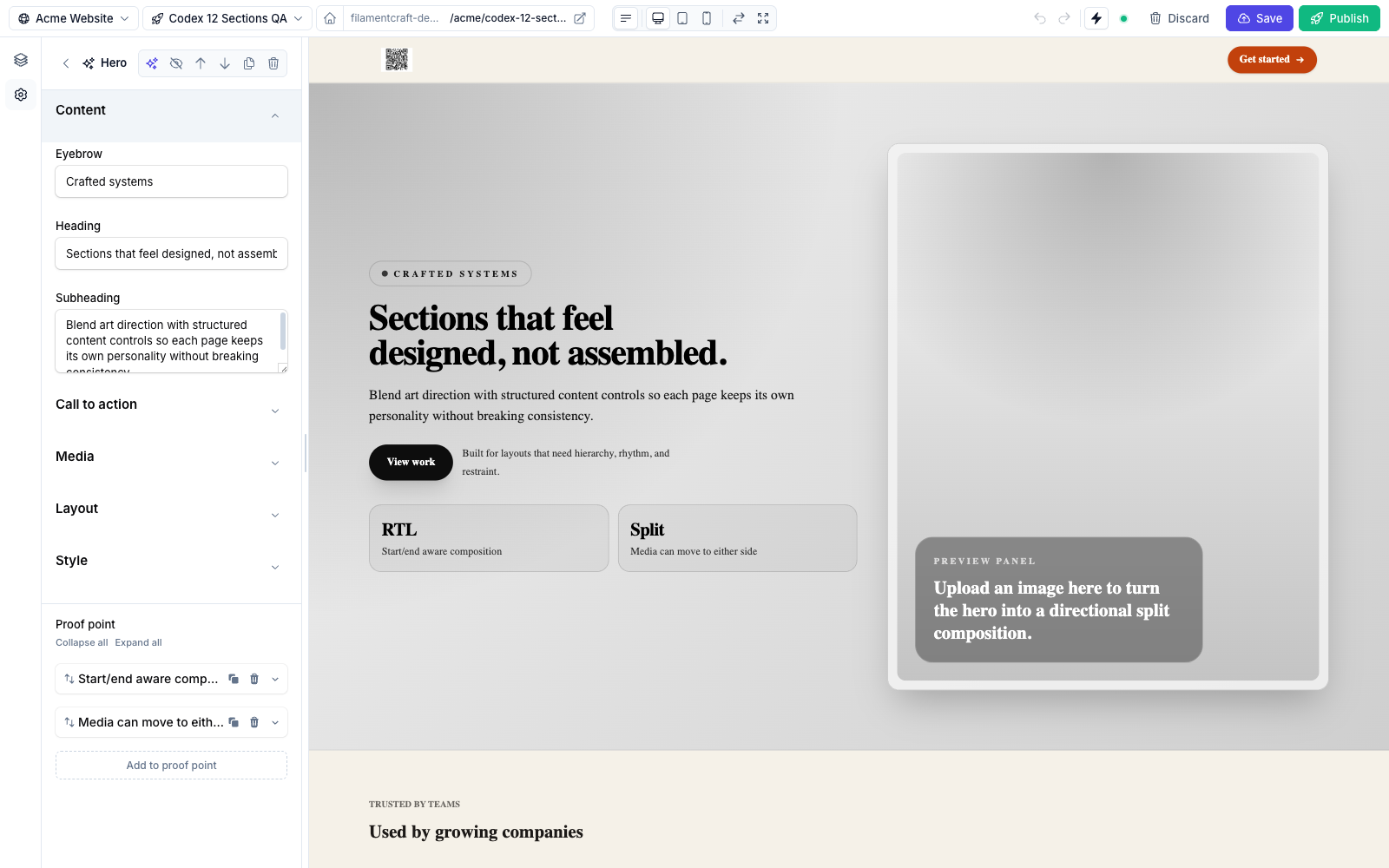
Text, a Heading Text, and a Subheading Textarea.Text
A single-line input, compiled to a Filament TextInput.
php
use FilamentCraft\Settings\Types\Text;

Text::make('heading')
    ->label('Heading')
    ->placeholder('Welcome to Acme')
    ->maxLength(80)
    ->default('Welcome')
->required();| Method | Effect |
|---|---|
placeholder(string $placeholder) | Greyed-out hint shown when empty. |
maxLength(int $maxLength) | Hard character cap (enforced by Filament's maxLength). |
Plus all shared methods.
Textarea
A multi-line input, compiled to a Filament Textarea.
php
use FilamentCraft\Settings\Types\Textarea;

Textarea::make('subheading')
    ->label('Subheading')
    ->placeholder('A short supporting sentence')
->rows(4);| Method | Effect |
|---|---|
placeholder(string $placeholder) | Empty-state hint. |
rows(int $rows) | Visible row count. Default 3. |
One value per line
Several built-in sections (e.g. the Pricing plan's features) store a Textarea value and split it on newlines in the Blade view. It's a simple way to accept a list without a repeater.
Number
A numeric input, compiled to a TextInput()->numeric(). Stores a number; ideal for counts, weights, or any integer setting.
php
use FilamentCraft\Settings\Types\Number;

Number::make('columns')
    ->label('Columns')
    ->min(1)
    ->max(6)
    ->step(1)
->default(3);| Method | Effect |
|---|---|
min(int $min) | Minimum allowed value (minValue). |
max(int $max) | Maximum allowed value (maxValue). |
step(int $step) | Increment step. |
Range
A numeric input designed for CSS dimensions. It is the type you reach for in themes: pair it with cssVar() and a unit() and the resolved value lands in <style id="fc-tokens"> with the unit appended.
php
use FilamentCraft\Settings\Types\Range;

Range::make('body_size')
    ->cssVar('--font-body-size', 'px')
    ->unit('px')
    ->min(12)
    ->max(20)
    ->step(1)
    ->default(16);
// emits: --font-body-size: 16px;| Method | Effect |
|---|---|
min(int|float $min) | Minimum value. Default 0. |
max(int|float $max) | Maximum value. Default 100. |
step(int|float $step) | Increment step (accepts floats, e.g. 0.05). Default 1. |
unit(string $unit) | Unit suffix shown in the label. |
min, max, and step accept floats, so Range works for em, rem, and unitless line-heights as well as pixels.
unit() and cssVar() are independent
unit() is cosmetic — it only labels the slider. The unit appended to the emitted CSS comes from the second argument to cssVar(). The example above passes 'px' to both, which is typical but not required: a heading scale wants ->cssVar('--font-heading-scale') with no CSS unit and ->unit('×') in the label.