
Appearance
Brand Kit
A Brand Kit locks a site's design system to a client's brand book: the exact fonts that may be picked, an approved color palette, per-section typography, and any hidden built-in schemes. Every constraint is authoring-time only — content already stored on a site keeps rendering, so shipping a kit to a live site can never break a page.
It's the answer to the agency question: "the client mandates two fonts plus a system fallback and eight colors — how do I stop editors picking anything else?" Operators add their own fonts right in the editor (below); you lock the rest down in code.
Add a custom font (in the editor)
Client fonts are rarely on any CDN, and operators shouldn't need a developer to add one. Every font picker in the editor carries an + Add custom font button in its footer — no admin screen, no code. The button stays even when a brand kit locks the picker, because a font you add is a brand font.
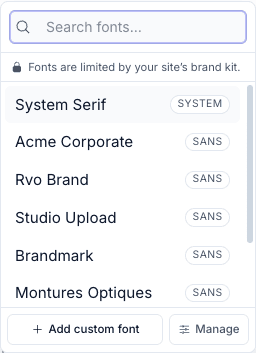
Download the font files, then in any typography picker click Add custom font:
- Give the font a name (the slug auto-fills).
- Pick a category (drives the fallback stack).
- Under Font files, add one row per weight/style — either upload a
.woff2/.woff/.ttf/.otffile, or paste a URL / path to a file already on a CDN or inpublic/. - For a web-safe/system font with no files, leave the files empty and set a font stack (e.g.
Arial, Helvetica, sans-serif).
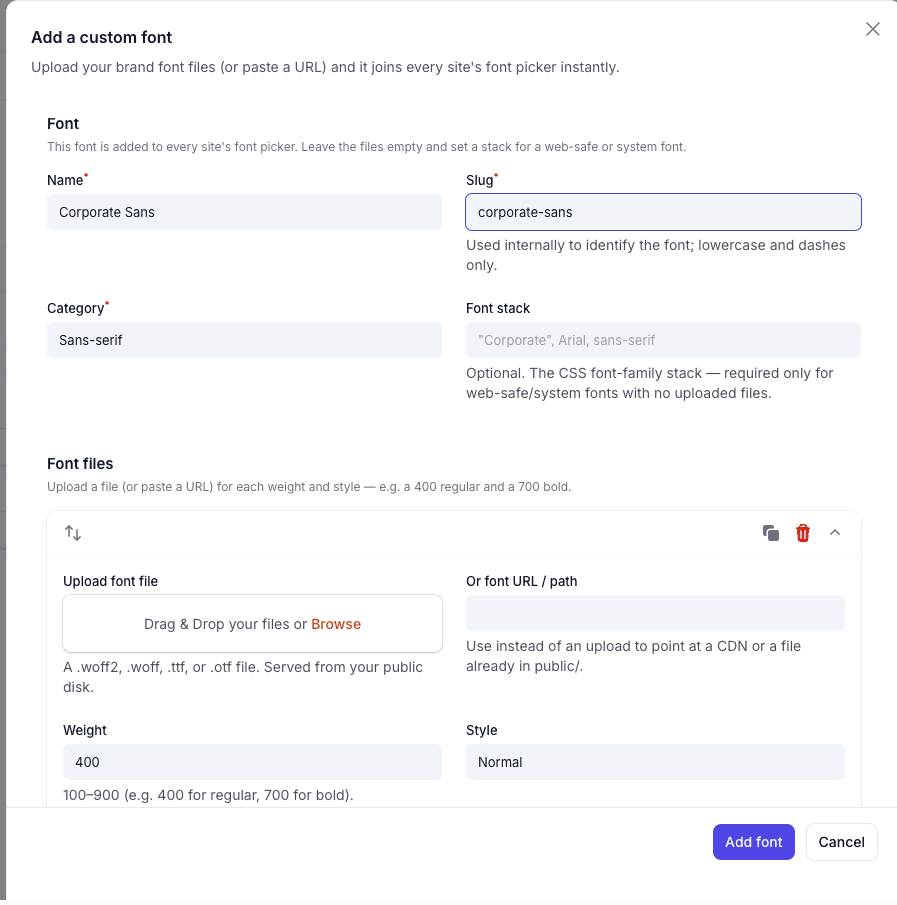
Save, and the font is selected in the picker you added it from and instantly appears in every other site's picker too, with its @font-face emitted on the storefront and editor preview. Uploaded files are served from your public disk (run php artisan storage:link once).
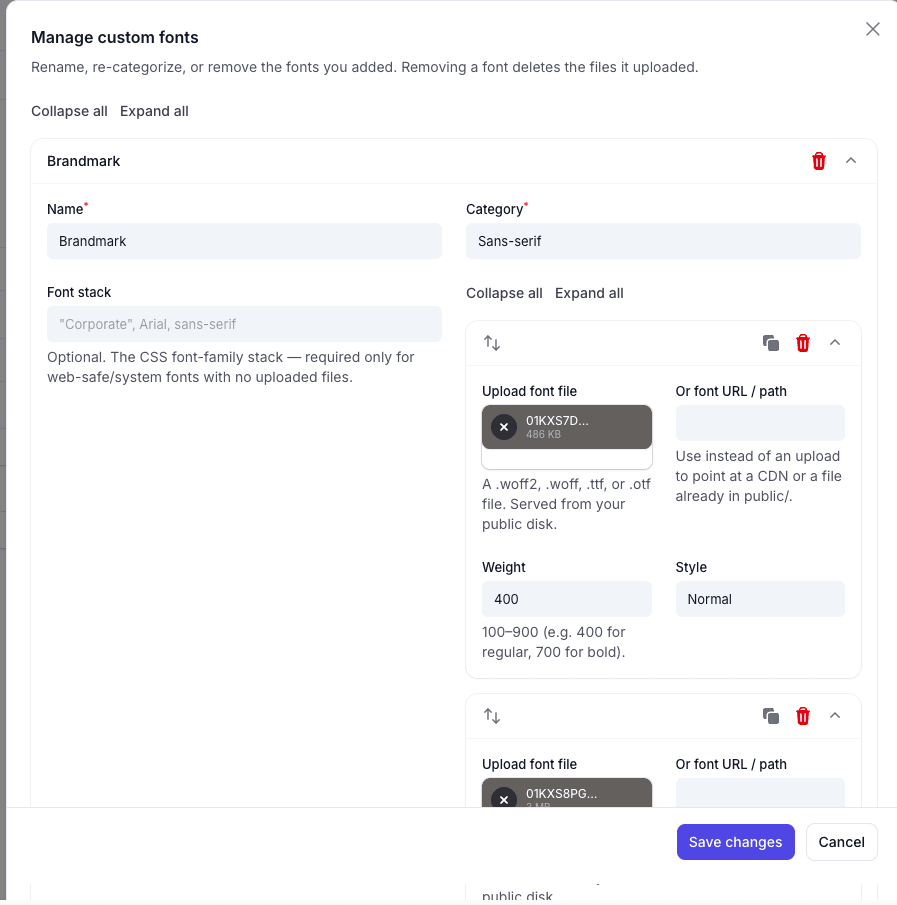
The Manage button next to it lists the fonts you added, so you can rename, re-categorize, or remove one (removing it deletes the files it uploaded). These fonts are global — shared across all sites the panel manages — and each can be listed in a ->brandFonts([...]) allow-list by its slug.
Security
Uploads are restricted to font MIME types and verified by their file-header magic bytes, so a script renamed .woff2 is rejected. @font-face src URLs and family names are validated component-by-component before emission — a crafted value can never break out of the <style> block.
Lock the design system (in code)
Everything else is configured fluently on the plugin. The lock applies to the panel you register it on, so an app with several panels can lock one and leave the others open:
php
use FilamentCraft\FilamentCraftPlugin;
use FilamentCraft\Support\BrandFont;
use FilamentCraft\Support\BrandKit;
use FilamentCraft\Enums\FontCategory;

FilamentCraftPlugin::make()
    // 1. Register the client's two brand fonts (self-hosted) + one web-safe fallback.
    ->registerFont(
        BrandFont::make('rvo-display', 'RVO Display')
            ->category(FontCategory::Display)
            ->face(asset('fonts/rvo-display.woff2'), '400')
            ->face(asset('fonts/rvo-display-bold.woff2'), '700'),
    )
    ->registerFont(
        BrandFont::make('rvo-text', 'RVO Text')
            ->category(FontCategory::Sans)
            ->face(asset('fonts/rvo-text.woff2'), '400')
            ->face(asset('fonts/rvo-text.woff2'), '600'),
    )
    ->registerFont(
        // Stack-only: any web-safe / system font, no files, no @font-face.
        BrandFont::make('corporate-arial', 'Corporate Arial')
            ->stack('Arial, Helvetica, sans-serif'),
    )
    // 2. Lock every font picker to just those three (+ any font added in the editor).
    ->brandFonts(['rvo-display', 'rvo-text', 'corporate-arial'])
    // 3. Lock every color picker to the eight approved colors.
    ->brandPalette([
        '#0B1F3A' => 'Navy',
        '#1D4ED8' => 'Royal',
        '#0EA5E9' => 'Sky',
        '#10B981' => 'Emerald',
        '#F59E0B' => 'Amber',
        '#EF4444' => 'Coral',
        '#111827' => 'Ink',
        '#F5F1E8' => 'Paper',
    ])
    // 4. Hide the 14 built-in schemes so only your brand schemes show.
    ->withoutBuiltinSchemes();
That's the whole design-system lock. The rest of this page explains each piece.
Font allow-list
->brandFonts([...]) restricts every font picker on the site — theme typography and per-section overrides — to the given catalog slugs. The picker drops its category chips (the short list is the curation) and shows a small "limited by your brand kit" hint so a short list never reads as a bug.
Slugs are font catalog slugs: Bunny roster slugs (inter, merriweather), the three system stacks (system-sans, system-serif, system-mono), or the slug of any font you register (below).
Fonts you add stay available under the lock. A brand-kit font lock narrows the Bunny catalog, but any font you add through the editor (above) or register in code is a brand font by definition — so it stays pickable, and the + Add custom font button stays in every locked picker. A lock means "no random Google fonts," not "no new brand fonts." Only a strict per-field Font::only([...]) list hides the add button (that field wants an exact set).
Need a per-field allow-list instead of a site-wide one? Use Font::only([...]) on a single setting — it wins over the kit and is kept exact (custom fonts are not auto-added to it):
php
use FilamentCraft\Settings\Types\Font;

Font::make('heading_font')->only(['rvo-display', 'rvo-text']);
Registering brand fonts in code
For fonts you'd rather version with your app (or ship inside a theme), BrandFont registers them from the panel provider — the same catalog, no DB row. Two flavours:
Self-hosted — point ->face() at .woff2 files your app serves. FilamentCraft emits the @font-face rules (with font-display: swap) into every page, storefront and editor preview alike. Add one ->face() per weight/style:
php
use FilamentCraft\Enums\FontStyle;

BrandFont::make('rvo-text', 'RVO Text')
    ->category(FontCategory::Sans)
    ->face(asset('fonts/rvo-text.woff2'), '400')
    ->face(asset('fonts/rvo-text-italic.woff2'), '400', FontStyle::Italic)
    ->face(asset('fonts/rvo-text-bold.woff2'), '700');
Stack-only — any web-safe or system font the client's machines already have. No files, no @font-face, just a CSS stack:
php
BrandFont::make('corporate-arial', 'Corporate Arial')->stack('Arial, Helvetica, sans-serif');A registered slug that shadows a Bunny slug wins, and never emits a Bunny <link> — the font resolves entirely from your @font-face (or the stack).
Security
@font-face src URLs and family names are validated component-by-component before emission (a bad src, weight, or family drops that face), so a crafted value can never break out of the <style> block. Keep font files on the public disk / your own CDN.
Brand colors
Brand color works on two layers — know which one you need:
| Layer | What it does | Set with |
|---|---|---|
| Color scheme | Paints the whole page — every section's background, text, buttons, accents | Brand schemes on Theme.tokens_json['schemes'] + ->withoutBuiltinSchemes() |
| Palette lock | Constrains a single color field (e.g. one section's accent) to approved swatches | ->brandPalette([...]) / Color::palette([...]) |
How a scheme paints the page
A color scheme is a complete set of ~24 named color roles — background, on-background, surface, on-surface, primary, on-primary, secondary, accent, neutral, plus their on-* (foreground) pairs. Every section and every built-in primitive is written against those roles as CSS custom properties (var(--fc-color-primary), var(--fc-color-background), …) — no section hardcodes a hex.
At render time the DesignTokenCompiler walks the theme's schemes (built-ins merged with your tokens_json['schemes']) and emits, into <style id="fc-tokens">:
- the default scheme's roles onto
:root(--fc-color-primary: #…;…), and - one selector block per scheme so pinning it re-tokens that subtree:
[data-fc-color-scheme="brand-dark"] { --fc-color-primary: #…; … }.
A page or section then just carries data-fc-color-scheme="brand-dark" (chosen from the scheme picker), and the entire subtree recolors at once — because everything reads the same variables. That's the whole mechanism: swap the active scheme → swap all brand colors.
Making the page use your brand colors
- Define one or more brand schemes on the theme's
tokens_json['schemes'](e.g.brand-light,brand-dark), settingprimary,background,surface,accent, … to your client's hex values. (A site may also add/override schemes viaSite.settings_json['schemes'].) - Hide the built-ins so editors see only your schemes:
php
->withoutBuiltinSchemes();                       // hide all 14 built-ins
->withoutBuiltinSchemes(['cupcake', 'nord']);    // or just some
Hiding is picker-only: a page already pinned to a built-in scheme still resolves its tokens and renders unchanged (the renderer always emits every scheme's variables). FilamentCraft also guards against emptying the picker — if hiding would leave zero visible schemes, the full set is shown.
Palette lock (individual color fields)
->brandPalette([...]) turns every plain Color picker into a swatch grid limited to the approved colors — for the standalone color settings a section exposes (an accent, a divider color), not the page-wide scheme. Pass a flat list of hex strings, or a hex => label map whose labels become swatch tooltips (and accessible names). By default the grid offers no custom-color escape; pass locked: false to add a native color fallback:
php
->brandPalette(['#0B1F3A' => 'Navy', '#1D4ED8' => 'Royal'], locked: false);Per-setting override:
php
use FilamentCraft\Settings\Types\Color;

Color::make('accent')->palette(['#0B1F3A', '#1D4ED8'], allowCustom: false);
The palette lock is authoring-time only, and does not recolor the page on its own — to brand the whole page, use brand schemes (above). Use both together: schemes paint the page, the palette keeps per-field color choices on-brand.
Per-section typography
Every section gains a collapsed Typography panel with a Heading font and Body font override. Left on Theme default the section inherits the site fonts; pick a font and just that section re-fonts. Both honour the font allow-list, and one click resets back to inherit.
Under the hood the override emits inline --font-heading / --font-default CSS variables on the section wrapper — the same variables the theme sets at :root — so the change cascades through the section with no per-section stylesheet. Turn the feature off globally:
php
// config/filamentcraft.php
'sections' => [
    'typography_overrides' => false,
],
Custom CSS
For bespoke rules the settings can't express (custom button treatments, etc.), ship a stylesheet from your theme class — it's injected into every page's <head>, storefront and editor preview:
php
final class RvoTheme extends AbstractTheme
{
    public function stylesheets(): array
    {
        return [asset('css/rvo-brand.css')];
    }
}
See Theme Authoring for the full theme class. Host-wide stylesheets (not tied to a theme) go through ->stylesheet(...) or config('filamentcraft.assets.extra_styles').
Verifying a kit
php artisan filamentcraft:doctor has a Brand kit check group: it confirms allow-listed slugs resolve in the catalog, self-hosted font files exist under public/, palette colors are valid hex, and hidden-scheme slugs are real built-ins. Each panel's kit is checked under its own label (Brand palette — panel studio). php artisan about summarises every kit and the panel it belongs to.
Where it lives
| Piece | Storage | Why |
|---|---|---|
| Font allow-list, palette, hidden schemes | The panel's plugin (->brandKit(), ->brandFonts() …) | Scoped to that panel |
| App-wide default kit | config('filamentcraft.brand') | Applies to panels without their own kit |
| Operator-added fonts | filamentcraft_custom_fonts table (editor font picker → Add custom font) | Self-service, global, no deploy |
| Code-registered fonts | config('filamentcraft.fonts.register') | Global: they only add fonts to the catalog; each panel's allow-list decides what shows |
| Brand color schemes | Theme.tokens_json['schemes'] | Shared across every site on the theme |
Which kit applies, first match wins:
- The site's theme, if its class implements
FilamentCraft\Theming\HasBrandKit. Useful when one app ships a different theme per client. - The kit set on the current panel's plugin.
config('filamentcraft.brand'). The plugin's fluent calls build on top of it, so config can set the fonts and a panel can add a palette.
The kit only restricts the editor's pickers. Published pages render whatever is stored, on every panel and on the public site.
Before 1.40.8
The fluent calls wrote to config('filamentcraft.brand'), so with several panels the last one registered locked all of them.