
Appearance
Color Inputs
Four types handle color, ranging from a single swatch to a full multi-token scheme system: Color, Gradient, ColorScheme, and ColorSchemeGroup.
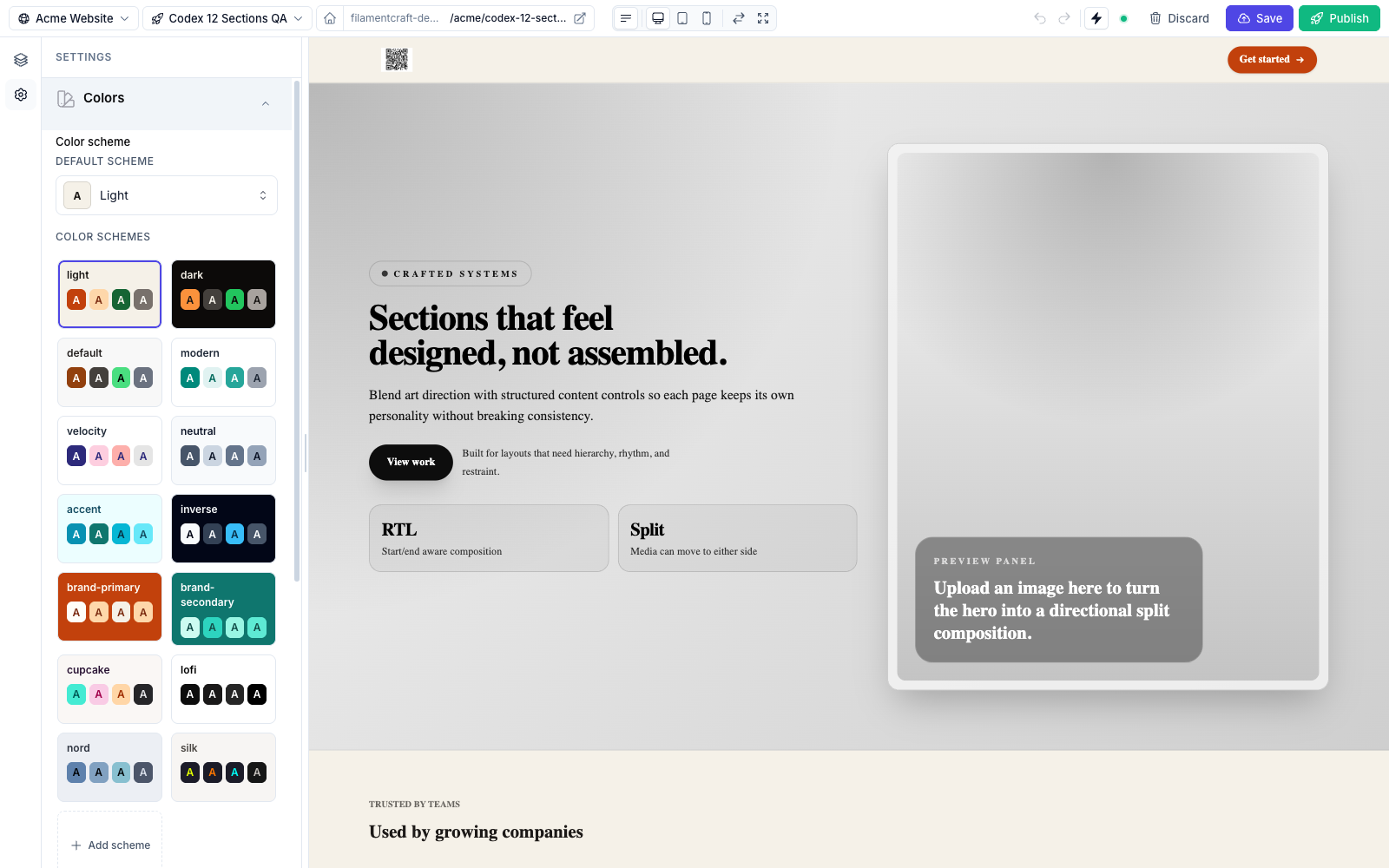
ColorSchemeGroup rendered in the theme panel — a grid of scheme tiles, each a swatch of its 22 tokens, plus an "Add scheme" affordance.Color
A single color picker, compiled to a Filament ColorPicker. Stores a hex string. Uses the lazy live(onBlur: true) update mode.
php
use FilamentCraft\Settings\Types\Color;

Color::make('accent')
    ->label('Accent color')
    ->cssVar('--accent')
->default('#f59e0b');| Method | Effect |
|---|---|
allowAlpha(bool $value = true) | Switch the picker to rgba so users can set an opacity. |
palette(array $colors, bool $allowCustom = false) | Restrict the picker to a fixed swatch grid (a brand-kit palette). |
palette() accepts a flat hex list or a hex => label map, and swaps the free-form picker for a keyboard-navigable swatch grid. To lock every Color picker to one palette site-wide, use ->brandPalette([...]) — see the Brand Kit.
With allowAlpha() the picker stores an rgba(…) string; without it, an opaque hex. Either way the reader is a ColorValue:
php
Color::make('overlay')->allowAlpha()->default('rgba(0, 0, 0, 0.5)');Reading the setting back gives you a ColorValue (or null for an unset or invalid value), not the raw string. It's Stringable — {{ $accent }} emits the hex — and exposes ->hex, ->alpha (set from an alpha-carrying rgba(…) or 8-digit hex, otherwise null), and ->rgba():
blade
@php($accent = $section->settings->get('accent'))
<span @if ($accent) style="color: {{ $accent }}" @endif>…</span>
Reach for Color when you need one ad-hoc color. For a coordinated palette that sections can reference semantically (bg-primary, text-on-surface), use a color scheme instead.
Gradient
A linear / radial gradient editor, compiled to FilamentCraft's GradientField. It renders a live preview bar, a type toggle, an angle dial (linear), and a draggable list of color stops.
Gradient editor — live preview bar, linear/radial toggle, angle dial, and color stops.php
use FilamentCraft\Settings\Types\Gradient;

Gradient::make('background_gradient')
    ->label('Background gradient')
    ->minStops(2)->maxStops(5);

// Linear-only, with the radial option hidden:
Gradient::make('overlay')->linearOnly();| Method | Effect |
|---|---|
types(array $types) | Allowed types — subset of ['linear', 'radial']. |
linearOnly() | Shorthand for types(['linear']) (hides the radial controls). |
allowRadial(bool $value = true) | Toggle the radial option without replacing types(). |
minStops(int $count) | Minimum color stops (clamped to ≥ 2). |
maxStops(int $count) | Maximum color stops. Default 6, and never less than minStops — so call minStops() first if you set both. |
allowAlpha(bool $value = true) | Allow alpha in stop colors. |
The stored value is a structured object — {type, angle, shape, position, stops: [{color, position}]}. Stop colors are restricted to a hex value or a var(--fc-color-*) token reference, so a gradient can track the active color scheme (and so a crafted value can never break out of the style attribute). Read it in a section's Blade view through the value object's css() helper, which builds the linear-gradient(...) / radial-gradient(...) string:
blade
@php($bg = $section->settings->get('background_gradient'))
<section @if ($bg) style="background-image: {{ $bg->css() }}" @endif>
  …
</section>
$bg is a GradientValue (or null). It exposes isLinear(), firstColor(), lastColor(), and is Stringable, so {{ $bg }} emits the same gradient string.
A raw CSS gradient string is also accepted as a default (or stored value) — ->default('linear-gradient(135deg, #111 0%, #333 100%)'). linear-, radial-, and conic-gradient(...) strings pass a CSS-safe sanitiser (no ;, {, }, <, > inside the parentheses); anything else reads back as null. css() returns a validated raw string verbatim.
ColorScheme
A scheme picker, compiled to FilamentCraft's ColorSchemePicker. It lets the editor choose which color scheme a section (or block) renders with — the schemes themselves are defined by ColorSchemeGroup (below) or shipped as built-ins. Uses the instant live() update mode.
php
use FilamentCraft\Settings\Types\ColorScheme;

ColorScheme::make('scheme')
->label('Color scheme');| Method | Effect |
|---|---|
inheritable(bool $value = true) | Allow an "inherit" option so the section falls back to the page/theme scheme. Defaults to true — pass inheritable(false) to force an explicit choice. |
Every built-in section exposes a ColorScheme::make('scheme') control. In the Blade view the selected scheme is applied with:
blade
<div {!! $section->colorScheme()->attributes() !!} class="bg-background text-on-background">
  …
</div>
$section->colorScheme() returns a ColorSchemeValue. Besides attributes(), it exposes ->slug (also its Stringable form), background() / foreground() token shortcuts, token('primary') for any of the 22 tokens, classes('surface') to build the matching bg-surface text-on-surface class pair, and outputCssVars(), which emits the scheme's --fc-color-* / --color-* declarations for an inline style attribute.
ColorSchemeGroup
The full scheme manager, compiled to FilamentCraft's ColorSchemeGroupField. This is a theme-level control: it renders a grid of scheme tiles plus an "Add scheme" affordance, and drilling into a tile opens the 22-token editor.
php
use FilamentCraft\Settings\Types\ColorSchemeGroup;

ColorSchemeGroup::make('color_scheme')->default('light');
ColorSchemeGroup takes no extra configuration beyond the shared methods — its behaviour (token set, built-in schemes, OkLch shade generation) is fixed.
The 22 tokens per scheme are: Background, On Background, Surface, On Surface, Surface Alt, On Surface-Alt, Primary, On Primary, Secondary, On Secondary, Accent, On Accent, Neutral, On Neutral, Info, On Info, Success, On Success, Warning, On Warning, Danger, On Danger.
For the full scheme system — the 14 shipped schemes, auto-generated OkLch shades, per-site persistence, and the Tailwind @theme mapping — see the dedicated Color Schemes page.